

Land F/X Requires AutoCAD 2010 or Greater (Opening F/X CAD)
Updated on: June 06, 2025
Issue
You saw the following error message when starting F/X CAD:
Land F/X requires AutocCAD 2010 or greater.

Cause
You're running an older version of the Land F/X Server component that may not be compatible with newer versions of F/X CAD.
Land F/X is compatible with AutoCAD, AutoCAD Civil 3D, or Map3D, versions {jumi[*3]}and newer, and F/X CAD versions {jumi[*3]} – {jumi[*22]}. Land F/X is not compatible with AutoCAD LT, AutoCAD 360, or AutoCAD for Mac, although Mac users can operate Land F/X with a Windows Virtual Machine created with the Parallels application. More information
Solution
1. Open your LandFX folder, and check the date of the file landfx.vlx. If this file is more than a year old, you're running an outdated version.

2. If you are, in fact, running an outdated version, contact us via a technical support ticket and request the latest version of landfx.vlx.
3. Verify that F/X CAD is closed.
4. Drag and drop the new landfx.vlx file into the LandFX folder.

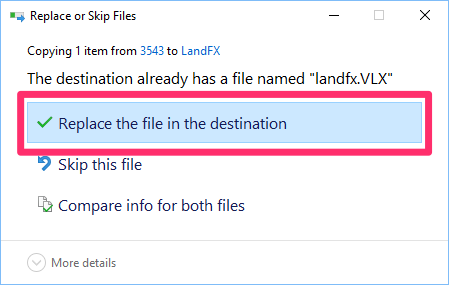
5. You'll receive a message that the destination folder already has a file named landfx.vlx.
Select Replace the file in the destination.
This option may have a slightly different name depending on your version of Windows.
6. Reopen F/X CAD. You should now be able to use F/X CAD without issue.