

Land F/X
  • Portal
  • Products
    • Detail F/X
      • Product
      • Features
      • Trial
      • Purchase
    • Planting F/X
      • Product
      • Features
      • Trial
      • Purchase
    • Irrigation F/X
      • Product
      • Features
      • Trial
      • Purchase
    • F/X CAD
    • Plugin for Revit®
    • Plugin for SketchUp®
    • Plugin for Rhino®
    • Site & Hardscape
    • Lighting
    • Manufacturer Connection
    • Academic
    • Purchase
  • Support
    • Knowledge Base
    • Documentation
    • Submit Ticket
    • Updates
    • Forum
    • Install
  • Videos
    • Power Tips
    • Webinars
    • Podcasts
  • Who We Are
    • Contact Us
    • Careers
    • Gallery
    • News
Land F/X
  • Portal
  • Products
    • Detail F/X
      • Product
      • Features
      • Trial
      • Purchase
    • Planting F/X
      • Product
      • Features
      • Trial
      • Purchase
    • Irrigation F/X
      • Product
      • Features
      • Trial
      • Purchase
    • F/X CAD
    • Plugin for Revit®
    • Plugin for SketchUp®
    • Plugin for Rhino®
    • Site & Hardscape
    • Lighting
    • Manufacturer Connection
    • Academic
    • Purchase
  • Support
    • Knowledge Base
    • Documentation
    • Submit Ticket
    • Updates
    • Forum
    • Install
  • Videos
    • Power Tips
    • Webinars
    • Podcasts
  • Who We Are
    • Contact Us
    • Careers
    • Gallery
    • News
  1. Home
  2. Knowledge Base
  3. F/X CAD & AutoCAD
  4. System Performance
  5. Knowledge Base
  6. F/X CAD & AutoCAD
  7. Units & Scale
  8. Fix the DWG Units (-DWGUNITS)

    []

    F/X CAD 2022 Freezes When You Use a Multileader (MLeader) Label Tool, Edit Multiline Text (Mtext), or Run the MTEXT Command

    Updated on: April 18, 2022

    Issue

    You're using F/X CAD 2022, and your CAD installation is freezing when you:

    • Use a Multileader (MLeader) label tool, or
    • Edit multiline text (Mtext), or
    • Run the MTEXT command


    Cause

    These issues are the result of two components having been incorrectly flagged as already installed during F/X CAD 2022 installations and, as such, being skipped during installation.


    Solution

    1. Close CAD, if you haven't already.


    2. Use the link below to download our repair tool for this issue.


    fxcad2022_MTEXT_MLeader.zip


    Download the file to a location where you can easily find it, such as your desktop or Downloads folder.


    3. Locate the downloaded zip file named fxcad2022_MTEXT_MLeader.zip in the location you selected. Double-click this file to unzip it.

    zip file named fxcad2022_MTEXT_MLeader.zip


    Folder named fxcad2022_MTEXT_MLeader

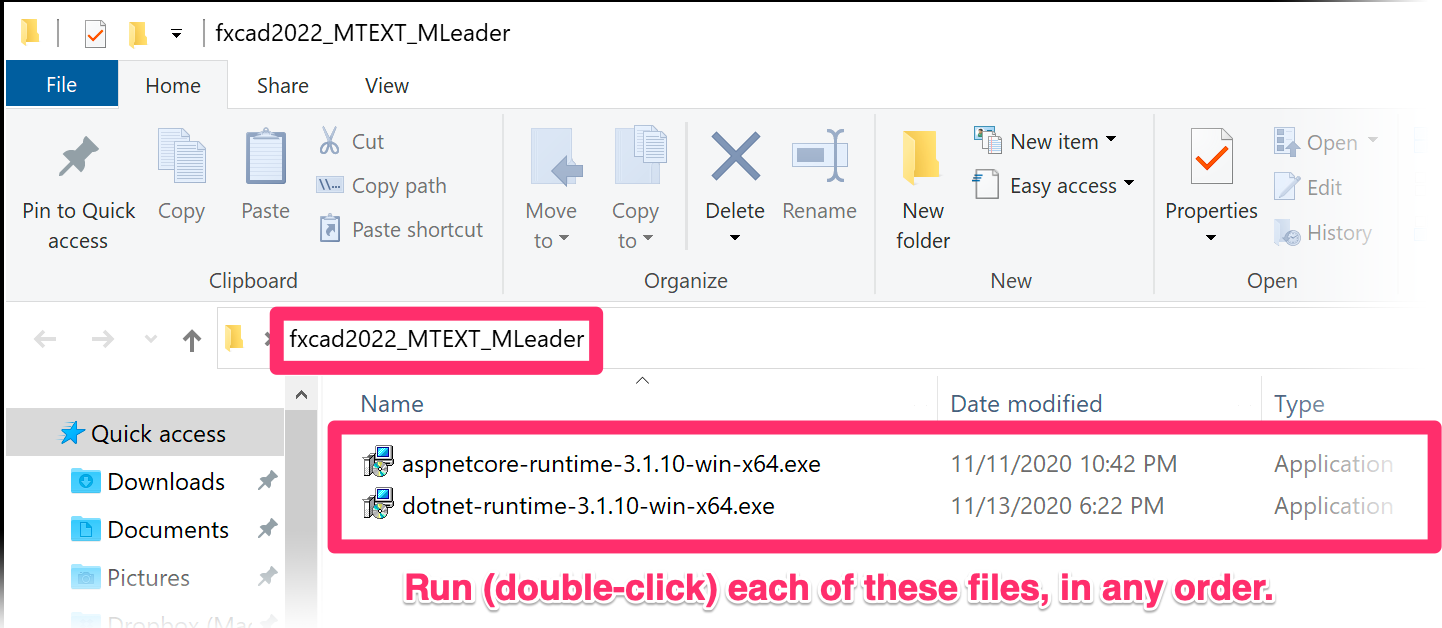
    4. You'll now have a folder named fxcad2022_MTEXT_MLeader in that same location.


    Run (double-click) each of the files within that folder. The order in which you run the files doesn't matter.


    The issue should now be resolved.

    Note that we've updated the F/X CAD 2022 installer to correct this issue, so future installations should not have this problem.

    Contact

    • Land F/X
    • PMB 351 3940 Broad St. STE 7
      San Luis Obispo, CA 93401
    • +1 805-541-1003
    Email Logo Facebook Logo Instagram Logo LinkedIn Logo
    Land F/X Logo

    Our software tailors AutoCAD®, Revit®, SketchUp®, and Rhino® to the needs of landscape architects, irrigation designers, and other professionals. We automate your most tedious tasks and ensure accuracy, giving you more time to design.

    • Portal
    • Products
    • Support
    • Videos
    • Who We Are