

Land F/X
  • Portal
  • Products
    • Detail F/X
      • Product
      • Features
      • Trial
      • Purchase
    • Planting F/X
      • Product
      • Features
      • Trial
      • Purchase
    • Irrigation F/X
      • Product
      • Features
      • Trial
      • Purchase
    • F/X CAD
    • Plugin for Revit®
    • Plugin for SketchUp®
    • Plugin for Rhino®
    • Site & Hardscape
    • Lighting
    • Manufacturer Connection
    • Academic
    • Purchase
  • Support
    • Knowledge Base
    • Documentation
    • Submit Ticket
    • Updates
    • Forum
    • Install
  • Videos
    • Power Tips
    • Webinars
    • Podcasts
  • Who We Are
    • Contact Us
    • Careers
    • Gallery
    • News
Land F/X
  • Portal
  • Products
    • Detail F/X
      • Product
      • Features
      • Trial
      • Purchase
    • Planting F/X
      • Product
      • Features
      • Trial
      • Purchase
    • Irrigation F/X
      • Product
      • Features
      • Trial
      • Purchase
    • F/X CAD
    • Plugin for Revit®
    • Plugin for SketchUp®
    • Plugin for Rhino®
    • Site & Hardscape
    • Lighting
    • Manufacturer Connection
    • Academic
    • Purchase
  • Support
    • Knowledge Base
    • Documentation
    • Submit Ticket
    • Updates
    • Forum
    • Install
  • Videos
    • Power Tips
    • Webinars
    • Podcasts
  • Who We Are
    • Contact Us
    • Careers
    • Gallery
    • News
  1. Home
  2. Knowledge Base
  3. Site & Details
  4. Organizing Details & Detail Folders
  5. Knowledge Base
  6. Site & Details
  7. Creating, Editing & Saving Details
  8. Bad DXF Group (51) (Saving a Detail)

    []

    No Valid Detail Title Block Found (Saving a Detail)

    Updated on: May 20, 2022

    Issue


    When trying to save a detail, you saw the following error message:

    No valid detail title block found.

    No valid detail title block found


    Cause


    The name of the Detail Template boundary layer has most likely been changed.


    This layer absolutely needs to be named L-DETL-BRDR-NPLT. If its name changes, Land F/X will be unable to recognize Detail Templates when you place them – hence, the error message.
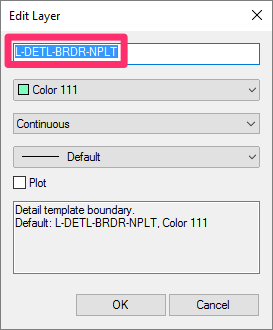
    Detail Template boundary layer name

    We've followed CAD layer naming standards closely in naming the layers that pertain to our software. Many of our default layers need to maintain their original names for Land F/X to function correctly. For this reason, you should be extremely careful when editing layer names. In fact, we really only added this ability in order to make our software fully customizable; in most cases, we don't recommend changing the names of layers.


    Solution


    To fix this issue, you'll first need to figure out the name of the layer assigned to Detail Template borders.


    Place a new Detail Template in your drawing.


    Select the border of the template, and open the Properties panel by typing Prop in the Command line. Then note the Layer name as pictured below.


    Opening the Properties panel and noting the template border layer name


    Now open the General Preferences. In the Layers section, scroll to and select the layer you found in the Properties panel.


    For example, let's say the name of the layer has been changed to L-DETL-BORDER. Scroll to and select this layer. Then click Edit.

    General Preferences screen. Layers section, Edit button


    Edit Layer dialog box, changing layer name

    The Edit Layer dialog box will open.


    Once you've found the layer with Detail template boundary in its description (see the image to the left), change that layer's name back to L-DETL-BRDR-NPLT.


    Click OK to save your changes.


    Back in the General Preferences, verify that the layer is now correctly named L-DETL-BRDR-NPLT.


    Click OK to save the change.
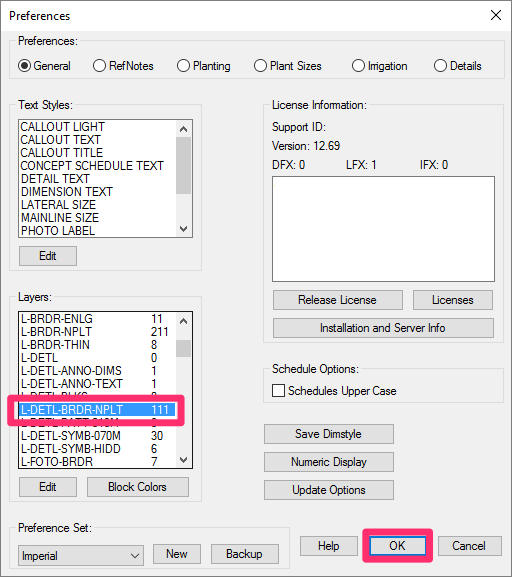
    General Preferences screen, layer named correctly


    You should now be able to save details without an issue.

    Contact

    • Land F/X
    • PMB 351 3940 Broad St. STE 7
      San Luis Obispo, CA 93401
    • +1 805-541-1003
    Email Logo Facebook Logo Instagram Logo LinkedIn Logo
    Land F/X Logo

    Our software tailors AutoCAD®, Revit®, SketchUp®, and Rhino® to the needs of landscape architects, irrigation designers, and other professionals. We automate your most tedious tasks and ensure accuracy, giving you more time to design.

    • Portal
    • Products
    • Support
    • Videos
    • Who We Are