
Land F/X
  • Portal
  • Products
    • Detail F/X
      • Product
      • Features
      • Trial
      • Purchase
    • Planting F/X
      • Product
      • Features
      • Trial
      • Purchase
    • Irrigation F/X
      • Product
      • Features
      • Trial
      • Purchase
    • F/X CAD
    • Plugin for Revit®
    • Plugin for SketchUp®
    • Plugin for Rhino®
    • Site & Hardscape
    • Lighting
    • Manufacturer Connection
    • Academic
    • Purchase
  • Support
    • Knowledge Base
    • Documentation
    • Submit Ticket
    • Updates
    • Forum
    • Install
  • Videos
    • Power Tips
    • Webinars
    • Podcasts
  • Who We Are
    • Contact Us
    • Careers
    • Gallery
    • News
Land F/X
  • Portal
  • Products
    • Planting F/X
      • Product
      • Features
      • Trial
      • Purchase
    • Irrigation F/X
      • Product
      • Features
      • Trial
      • Purchase
    • F/X CAD
    • Plugin for Revit®
    • Plugin for SketchUp®
    • Plugin for Rhino®
    • Details
    • Site & Hardscape
    • Lighting
    • Academic
    • Manufacturer Connection
    • Purchase
  • Support
    • Knowledge Base
    • Documentation
    • Submit Ticket
    • Updates
    • Forum
    • Install
  • Videos
    • Power Tips
    • Webinars
    • Podcasts
  • Who We Are
    • Contact Us
    • Careers
    • Gallery
    • News
  1. Home
  2. Knowledge Base
  3. Site & Details
  4. Text & Annotation
  5. Change Units Shown in Dimensions – Imperial

    []

    Use the Old Text Leaders (Without MLeaders or Background Masks)

    Updated on: May 20, 2022

    Issue

    You want to use the old site leaders with text – that is, the versions prior to our update that turned these leaders into MLeaders with background masks.
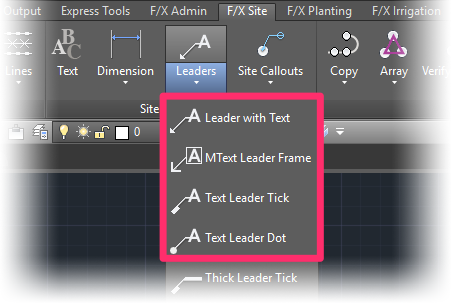
    Old site leaders with text on ribbon


    Solution

    At the request of a few Land F/X users, we've added Command line keyboard commands for our four site leaders with text. The following commands will result in the corresponding text leader in the old style, without Mleaders and without background masks:

    • Leader with Text: Type FX_OldTextLeaderDim
    • MText Leader Frame: Type FX_OldMtextLeaderFrame
    • Text Leader Tick: Type FX_OldTextLeaderPline
    • Text Leader Dot: Type FX_OldTextLeaderDot

    If you want, you can assign a keyboard shortcut to each of these leader types.

    Contact

    • Land F/X
    • PMB 351 3940 Broad St. STE 7
      San Luis Obispo, CA 93401
    • +1 805-541-1003
    Email Logo Facebook Logo Instagram Logo LinkedIn Logo
    Land F/X Logo

    Our software tailors AutoCAD®, Revit®, SketchUp®, and Rhino® to the needs of landscape architects, irrigation designers, and other professionals. We automate your most tedious tasks and ensure accuracy, giving you more time to design.

    • Portal
    • Products
    • Support
    • Videos
    • Who We Are