

Land F/X
  • Portal
  • Products
    • Detail F/X
      • Product
      • Features
      • Trial
      • Purchase
    • Planting F/X
      • Product
      • Features
      • Trial
      • Purchase
    • Irrigation F/X
      • Product
      • Features
      • Trial
      • Purchase
    • F/X CAD
    • Plugin for Revit®
    • Plugin for SketchUp®
    • Plugin for Rhino®
    • Site & Hardscape
    • Lighting
    • Manufacturer Connection
    • Academic
    • Purchase
  • Support
    • Knowledge Base
    • Documentation
    • Submit Ticket
    • Updates
    • Forum
    • Install
  • Videos
    • Power Tips
    • Webinars
    • Podcasts
  • Who We Are
    • Contact Us
    • Careers
    • Gallery
    • News
Land F/X
  • Portal
  • Products
    • Detail F/X
      • Product
      • Features
      • Trial
      • Purchase
    • Planting F/X
      • Product
      • Features
      • Trial
      • Purchase
    • Irrigation F/X
      • Product
      • Features
      • Trial
      • Purchase
    • F/X CAD
    • Plugin for Revit®
    • Plugin for SketchUp®
    • Plugin for Rhino®
    • Site & Hardscape
    • Lighting
    • Manufacturer Connection
    • Academic
    • Purchase
  • Support
    • Knowledge Base
    • Documentation
    • Submit Ticket
    • Updates
    • Forum
    • Install
  • Videos
    • Power Tips
    • Webinars
    • Podcasts
  • Who We Are
    • Contact Us
    • Careers
    • Gallery
    • News
  1. Home
  2. Knowledge Base
  3. Irrigation
  4. Irrigation Schedules
  5. Incorrect Symbol in the Irrigation Schedule

    []

    Incorrect Symbol in the Irrigation Schedule

    Updated on: May 27, 2022

    Issue

    One of the symbols in your Irrigation Schedule is incorrect. For example, you might have a symbol for a head or valve in the schedule that does not match the symbol for the same equipment as it appears in your system design.
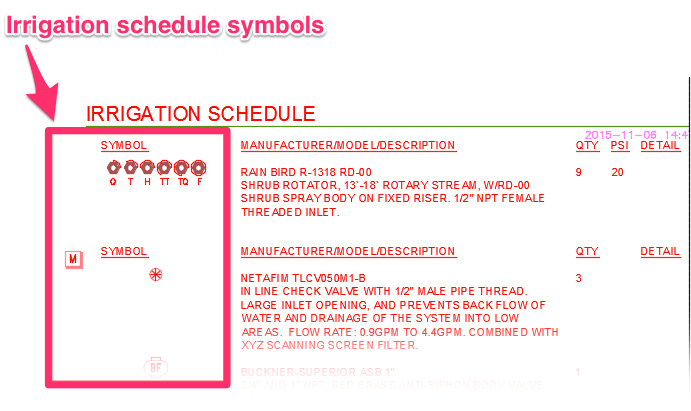
     

    Incorrect symbol in Irrigation Schedule


    Cause

    The symbol for the equipment in question may have become corrupt, or you simply have an outdated symbol block in your installation.


    Solution

    1. Explode the Irrigation Schedule. (Type Explode in the Command line, select the Irrigation Schedule, and press Enter.)


    2. Delete the problematic schedule symbol from the drawing. (Select it, type E for Erase, and press Enter.)


    3. Type Purge in the Command line, and press Enter.


    4. Delete the remainder of the Irrigation Schedule.


    5.Place an Irrigation Schedule again.


    The Schedule Symbol should come in correctly now. If not:


    6. Explode the schedule again.


    7. Type Prop in the Command line and press Enter to open the Properties panel. Select the problematic schedule symbol, and make note of its name. Then delete and Purge the symbol and the rest of the schedule out of the drawing again.


    8. Navigate to the folder LandFX/Blocks/Graphics/Irrigation/Schedule_Symbols, and locate the file with the same name as the problematic schedule symbol. Delete this file.


    9. Open CAD, and run an Irrigation Schedule again. The system will download the correct schedule symbol, and it should now come in correctly.

    Contact

    • Land F/X
    • PMB 351 3940 Broad St. STE 7
      San Luis Obispo, CA 93401
    • +1 805-541-1003
    Email Logo Facebook Logo Instagram Logo LinkedIn Logo
    Land F/X Logo

    Our software tailors AutoCAD®, Revit®, SketchUp®, and Rhino® to the needs of landscape architects, irrigation designers, and other professionals. We automate your most tedious tasks and ensure accuracy, giving you more time to design.

    • Portal
    • Products
    • Support
    • Videos
    • Who We Are