

Land F/X
  • Portal
  • Products
    • Detail F/X
      • Product
      • Features
      • Trial
      • Purchase
    • Planting F/X
      • Product
      • Features
      • Trial
      • Purchase
    • Irrigation F/X
      • Product
      • Features
      • Trial
      • Purchase
    • F/X CAD
    • Plugin for Revit®
    • Plugin for SketchUp®
    • Plugin for Rhino®
    • Site & Hardscape
    • Lighting
    • Manufacturer Connection
    • Academic
    • Purchase
  • Support
    • Knowledge Base
    • Documentation
    • Submit Ticket
    • Updates
    • Forum
    • Install
  • Videos
    • Power Tips
    • Webinars
    • Podcasts
  • Who We Are
    • Contact Us
    • Careers
    • Gallery
    • News
Land F/X
  • Portal
  • Products
    • Detail F/X
      • Product
      • Features
      • Trial
      • Purchase
    • Planting F/X
      • Product
      • Features
      • Trial
      • Purchase
    • Irrigation F/X
      • Product
      • Features
      • Trial
      • Purchase
    • F/X CAD
    • Plugin for Revit®
    • Plugin for SketchUp®
    • Plugin for Rhino®
    • Site & Hardscape
    • Lighting
    • Manufacturer Connection
    • Academic
    • Purchase
  • Support
    • Knowledge Base
    • Documentation
    • Submit Ticket
    • Updates
    • Forum
    • Install
  • Videos
    • Power Tips
    • Webinars
    • Podcasts
  • Who We Are
    • Contact Us
    • Careers
    • Gallery
    • News
  1. Home
  2. Knowledge Base
  3. Planting
  4. Plant Labels
  5. Plant Labels Coming In Away From Plants, In Wrong Location, and/or Not Appearing Correctly

    []

    Remove the "SF" or "Sq.M." Tag From a Plant Label

    Updated on: May 26, 2022

    Issue

    You want to remove the "SF" (square feet) or Sq.M. (square meters) tag from a plant label (see image below).
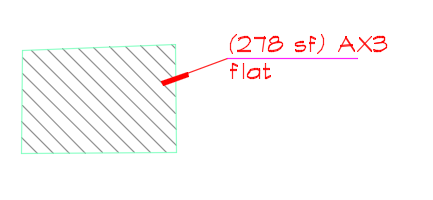


    Plant label reading SF
    Plant label reading Sq.M.

    Is a groundcover or Shrub Area label in your drawing only showing the letters "SF" or "Sq.M.," and nothing else? If so, your drawing units may have been changed or otherwise set incorrectly. If this is the case, use our Scale tool to verify and correct your drawing units.


    Groundcover label reading SF and nothing else
    Groundcover label reading Sq.M. and nothing else


    Solution

    Plant labels record plant counts in area (that is, square feet or meters) for groundcovers and Shrub Areas that have no plant spacing set. To remove the "SF" or "Sq.M." tag from a plant label, use our Edit Plant tool to select and edit the plant. 


    In the Plant Info dialog box, enter a Plant spacing value in inches or millimeters, depending on your drawing units.


    Plant Info dialog box, Plant spacing value in inches
    Plant Info dialog box, Plant spacing value in millimeters

    You can also edit your plants directly from the Plant Manager.


    Once you add a spacing value, your plant labels will calculate the selected Shrub Area or groundcover in actual plant quantity, rather than area.

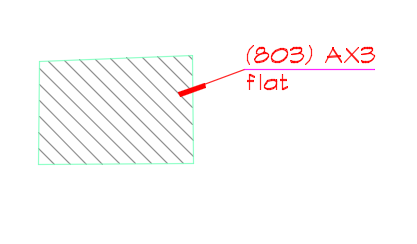
     

    Groundcover label calculating plants correctly, Imperial units


    Groundcover label calculating plants correctly, metric units

    Contact

    • Land F/X
    • PMB 351 3940 Broad St. STE 7
      San Luis Obispo, CA 93401
    • +1 805-541-1003
    Email Logo Facebook Logo Instagram Logo LinkedIn Logo
    Land F/X Logo

    Our software tailors AutoCAD®, Revit®, SketchUp®, and Rhino® to the needs of landscape architects, irrigation designers, and other professionals. We automate your most tedious tasks and ensure accuracy, giving you more time to design.

    • Portal
    • Products
    • Support
    • Videos
    • Who We Are