Land F/X
  • Portal
  • Products
    • Detail F/X
      • Product
      • Features
      • Trial
      • Purchase
    • Planting F/X
      • Product
      • Features
      • Trial
      • Purchase
    • Irrigation F/X
      • Product
      • Features
      • Trial
      • Purchase
    • F/X CAD
    • Plugin for Revit®
    • Plugin for SketchUp®
    • Plugin for Rhino®
    • Site & Hardscape
    • Lighting
    • Manufacturer Connection
    • Academic
    • Purchase
  • Support
    • Knowledge Base
    • Documentation
    • Submit Ticket
    • Updates
    • Forum
    • Install
  • Videos
    • Power Tips
    • Webinars
    • Podcasts
  • Who We Are
    • Contact Us
    • Careers
    • Gallery
    • News
Land F/X
  • Portal
  • Products
    • Detail F/X
      • Product
      • Features
      • Trial
      • Purchase
    • Planting F/X
      • Product
      • Features
      • Trial
      • Purchase
    • Irrigation F/X
      • Product
      • Features
      • Trial
      • Purchase
    • F/X CAD
    • Plugin for Revit®
    • Plugin for SketchUp®
    • Plugin for Rhino®
    • Site & Hardscape
    • Lighting
    • Manufacturer Connection
    • Academic
    • Purchase
  • Support
    • Knowledge Base
    • Documentation
    • Submit Ticket
    • Updates
    • Forum
    • Install
  • Videos
    • Power Tips
    • Webinars
    • Podcasts
  • Who We Are
    • Contact Us
    • Careers
    • Gallery
    • News
  1. Home
  2. Knowledge Base
  3. F/X CAD & AutoCAD
  4. Errors: F/X CAD & AutoCAD
  5. You Do Not Have Access Rights to \Mac ... (Opening or Saving a Drawing File on a Mac Using Parallels)

    []

    Fatal Error: Unhandled Access Violation Reading ... Exception, and AutoCAD Crashes

    Updated on: April 15, 2022

    Issue


    AutoCAD crashed, and you saw an error message similar to the following:

    Fatal Error: Unhandled Access Violation Reading 0x70d94980 Exception at fb8a7664h

    Unhandled Access Violation Reading 0x70d94980 Exception at fb8a7664h


    You may also have seen a message similar to this one: FATAL ERROR: Unhandled e0434352h Exception at fd5ba06dh


    Cause

    We've been seeing this issue from time to time with AutoCAD and AutoCAD Civil 3D 2017 installations. A quick fix from AutoCAD Service Pack 1 will take care of the problem.


    Solution

    AutoCAD cannot continue

    1. You might see the error message pictured to the left as well.


    Click No to close the error message.


    2. Follow this link to Autodesk's AutoCAD 2017 Service Pack 1 page.


    Click the correct AutoCAD 2017 SP1 version

    3. Scroll down on the Service Pack 1 page until you see the download options pictured to the left.


    Click the correct AutoCAD 2017 SP1 version for your computer (64-bit or 32-bit).

    This step will actually require you to download and install two separate files When you click the download link, your browser will either prompt you to download multiple files or open a secondary pop-up window, which may be easily overlooked or hiding behind the browser. (What you see will depend on your browser settings.) You may need to poke around a bit to find them. See the images below for examples.


    Using Google Chrome? You should see a message that the Autodesk site wants you to download multiple files. Click Allow.

    Allow downloads

    Using Mozilla Firefox? You'll have two download windows, which may or may not be hidden behind the browser window. Click Save File in each message.

    two download windows


    4. The following two files will download to your computer:

    • AutoCAD_2017_SP1_Part_2_Genuine
    • AutoCAD_2017_SP1_64bit


    Take note of the file names, and save the files in a location where you can find them easily.
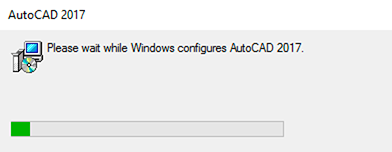


    5. Run each of the files you downloaded. Allow a few minutes for the Service Pack to install and repair your installation.
    Run each of the files you downloaded


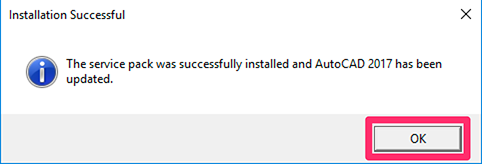
    the service pack was installed successfully
    6. You'll see a message that the service pack was installed successfully. Click OK.


    You should now be able to use AutoCAD 2017 or AutoCAD Civil 3D 2017 without getting the error.

    Contact

    • Land F/X
    • PMB 351 3940 Broad St. STE 7
      San Luis Obispo, CA 93401
    • +1 805-541-1003
    Email Logo Facebook Logo Instagram Logo LinkedIn Logo
    Land F/X Logo

    Our software tailors AutoCAD®, Revit®, SketchUp®, and Rhino® to the needs of landscape architects, irrigation designers, and other professionals. We automate your most tedious tasks and ensure accuracy, giving you more time to design.

    • Portal
    • Products
    • Support
    • Videos
    • Who We Are