

Land F/X
  • Portal
  • Products
    • Detail F/X
      • Product
      • Features
      • Trial
      • Purchase
    • Planting F/X
      • Product
      • Features
      • Trial
      • Purchase
    • Irrigation F/X
      • Product
      • Features
      • Trial
      • Purchase
    • F/X CAD
    • Plugin for Revit®
    • Plugin for SketchUp®
    • Plugin for Rhino®
    • Site & Hardscape
    • Lighting
    • Manufacturer Connection
    • Academic
    • Purchase
  • Support
    • Knowledge Base
    • Documentation
    • Submit Ticket
    • Updates
    • Forum
    • Install
  • Videos
    • Power Tips
    • Webinars
    • Podcasts
  • Who We Are
    • Contact Us
    • Careers
    • Gallery
    • News
Land F/X
  • Portal
  • Products
    • Detail F/X
      • Product
      • Features
      • Trial
      • Purchase
    • Planting F/X
      • Product
      • Features
      • Trial
      • Purchase
    • Irrigation F/X
      • Product
      • Features
      • Trial
      • Purchase
    • F/X CAD
    • Plugin for Revit®
    • Plugin for SketchUp®
    • Plugin for Rhino®
    • Site & Hardscape
    • Lighting
    • Manufacturer Connection
    • Academic
    • Purchase
  • Support
    • Knowledge Base
    • Documentation
    • Submit Ticket
    • Updates
    • Forum
    • Install
  • Videos
    • Power Tips
    • Webinars
    • Podcasts
  • Who We Are
    • Contact Us
    • Careers
    • Gallery
    • News
  1. Home
  2. Knowledge Base
  3. F/X CAD & AutoCAD
  4. Errors: F/X CAD & AutoCAD
  5. License Checkout Timed Out. What Do You Want to Do? (Opening AutoCAD or F/X CAD)

    []

    An Error Exists on This Page (Opening a PDF Created from AutoCAD or F/X CAD)

    Updated on: April 18, 2022

    Issue


    You received the following error message when attempting to open a PDF that was created using AutoCAD or F/X CAD:


    An error exists on this page. Acrobat may not display the page correctly. Please contact the person who created the PDF document to correct the problem.
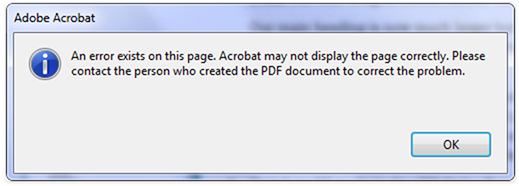
    An Error Exists on This Page


    The error also likely resulted in some objects or lines not appearing in the PDF.


    Cause

    The AutoCAD PDF plotter can be problematic at times, often leading to errors like this one.


    Solution


    Step 1: Try selecting a different style of the same page size.

    For example, we've encountered this issue when using the ARCH page sizes that are identified as "EXPAND" versions. Use the plain page size instead.


    If you've tried plotting to PDF using the ARCH EXPAND D (24 x 36 Inches) paper size, choose ARCH D (24 x 36 Inches) instead.

    choose ARCH D (24 x 36 Inches) paper size


    Step 2: Try a different PDF plotter.

    We've had good results with several third-party PDF plotters and found them to produce better-quality PDFs than the built-in AutoCAD PDF plotter. See our list of recommended third-party PDF printers for more information.

    If you've already used one of these third-party printers to create the file that's causing the problem, try using a different one.

    Contact

    • Land F/X
    • PMB 351 3940 Broad St. STE 7
      San Luis Obispo, CA 93401
    • +1 805-541-1003
    Email Logo Facebook Logo Instagram Logo LinkedIn Logo
    Land F/X Logo

    Our software tailors AutoCAD®, Revit®, SketchUp®, and Rhino® to the needs of landscape architects, irrigation designers, and other professionals. We automate your most tedious tasks and ensure accuracy, giving you more time to design.

    • Portal
    • Products
    • Support
    • Videos
    • Who We Are