

Land F/X
  • Portal
  • Products
    • Detail F/X
      • Product
      • Features
      • Trial
      • Purchase
    • Planting F/X
      • Product
      • Features
      • Trial
      • Purchase
    • Irrigation F/X
      • Product
      • Features
      • Trial
      • Purchase
    • F/X CAD
    • Plugin for Revit®
    • Plugin for SketchUp®
    • Plugin for Rhino®
    • Site & Hardscape
    • Lighting
    • Manufacturer Connection
    • Academic
    • Purchase
  • Support
    • Knowledge Base
    • Documentation
    • Submit Ticket
    • Updates
    • Forum
    • Install
  • Videos
    • Power Tips
    • Webinars
    • Podcasts
  • Who We Are
    • Contact Us
    • Careers
    • Gallery
    • News
Land F/X
  • Portal
  • Products
    • Detail F/X
      • Product
      • Features
      • Trial
      • Purchase
    • Planting F/X
      • Product
      • Features
      • Trial
      • Purchase
    • Irrigation F/X
      • Product
      • Features
      • Trial
      • Purchase
    • F/X CAD
    • Plugin for Revit®
    • Plugin for SketchUp®
    • Plugin for Rhino®
    • Site & Hardscape
    • Lighting
    • Manufacturer Connection
    • Academic
    • Purchase
  • Support
    • Knowledge Base
    • Documentation
    • Submit Ticket
    • Updates
    • Forum
    • Install
  • Videos
    • Power Tips
    • Webinars
    • Podcasts
  • Who We Are
    • Contact Us
    • Careers
    • Gallery
    • News
  1. Home
  2. Knowledge Base
  3. F/X CAD & AutoCAD
  4. System Performance
  5. CAD Freezes, Lags, or Has Slow Performance After You've Placed a Schedule or Other Block

    Panning in Model or Paper Space Causes the Screen to Flicker or Flash

    Updated on: April 18, 2022

    Issue

    Your screen is flickering or flashing as if you're taking a photo when you pan with the mouse in either Model or Paper Space.


    Cause

    We've seen this issue occur when the AutoCAD Status Bar is at the precise point between having one or two rows.


    Status Bar


    Solution

    Try each of the following steps to resolve this issue. Each step may resolve the issue on its own. If a step doesn't correct the issue, move on to the next step.


    1. Right-click the Model layout tab, then select Dock above status bar from the menu that opens.
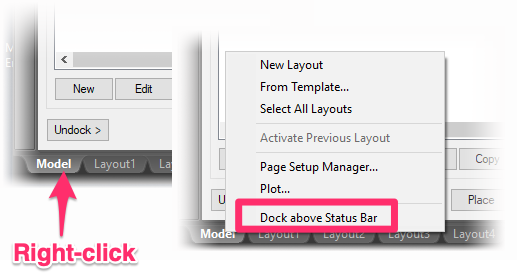
    Model layout tab


    2. Maximize your AutoCAD window so it takes up the full screen, or move its window borders to the edge of the screen.


    3. Type STATUSBARAUTOWRAP in the Command line and press Enter. When prompted to enter a value, type OFF and press Enter again.


    4. Reduce the width of the Status Bar by removing the Coordinates toggle.


    Click the button with three horizontal lines on the right end of the Status Bar (aka the "Hamburger Button") to open the menu pictured to the left. Then uncheck the Coordinates option from the menu to remove the corresponding toggle from the Status Bar.


    Click here to open the menu Coordinate Toggles Removed


    5. Remove additional toggles from the Status Bar by unchecking them in the same menu.

    Contact

    • Land F/X
    • PMB 351 3940 Broad St. STE 7
      San Luis Obispo, CA 93401
    • +1 805-541-1003
    Email Logo Facebook Logo Instagram Logo LinkedIn Logo
    Land F/X Logo

    Our software tailors AutoCAD®, Revit®, SketchUp®, and Rhino® to the needs of landscape architects, irrigation designers, and other professionals. We automate your most tedious tasks and ensure accuracy, giving you more time to design.

    • Portal
    • Products
    • Support
    • Videos
    • Who We Are