

Land F/X
  • Portal
  • Products
    • Detail F/X
      • Product
      • Features
      • Trial
      • Purchase
    • Planting F/X
      • Product
      • Features
      • Trial
      • Purchase
    • Irrigation F/X
      • Product
      • Features
      • Trial
      • Purchase
    • F/X CAD
    • Plugin for Revit®
    • Plugin for SketchUp®
    • Plugin for Rhino®
    • Site & Hardscape
    • Lighting
    • Manufacturer Connection
    • Academic
    • Purchase
  • Support
    • Knowledge Base
    • Documentation
    • Submit Ticket
    • Updates
    • Forum
    • Install
  • Videos
    • Power Tips
    • Webinars
    • Podcasts
  • Who We Are
    • Contact Us
    • Careers
    • Gallery
    • News
Land F/X
  • Portal
  • Products
    • Detail F/X
      • Product
      • Features
      • Trial
      • Purchase
    • Planting F/X
      • Product
      • Features
      • Trial
      • Purchase
    • Irrigation F/X
      • Product
      • Features
      • Trial
      • Purchase
    • F/X CAD
    • Plugin for Revit®
    • Plugin for SketchUp®
    • Plugin for Rhino®
    • Site & Hardscape
    • Lighting
    • Manufacturer Connection
    • Academic
    • Purchase
  • Support
    • Knowledge Base
    • Documentation
    • Submit Ticket
    • Updates
    • Forum
    • Install
  • Videos
    • Power Tips
    • Webinars
    • Podcasts
  • Who We Are
    • Contact Us
    • Careers
    • Gallery
    • News
  1. Home
  2. Knowledge Base
  3. F/X CAD & AutoCAD
  4. Plotting Issues & Techniques
  5. PLOT Command Locks Up or Freezes Before Reaching the Plot Dialog Box

    []

    Turn Off Background Plotting / Publishing

    Updated on: April 25, 2022

    Issue

    You need to turn off the Background Plotting setting.


    You may have seen one of the following error messages while attempting to plot to PDF:

    • F/X CAD requires a Land F/X license.
    • F/X CAD cannot function without Land F/X installed correctly.
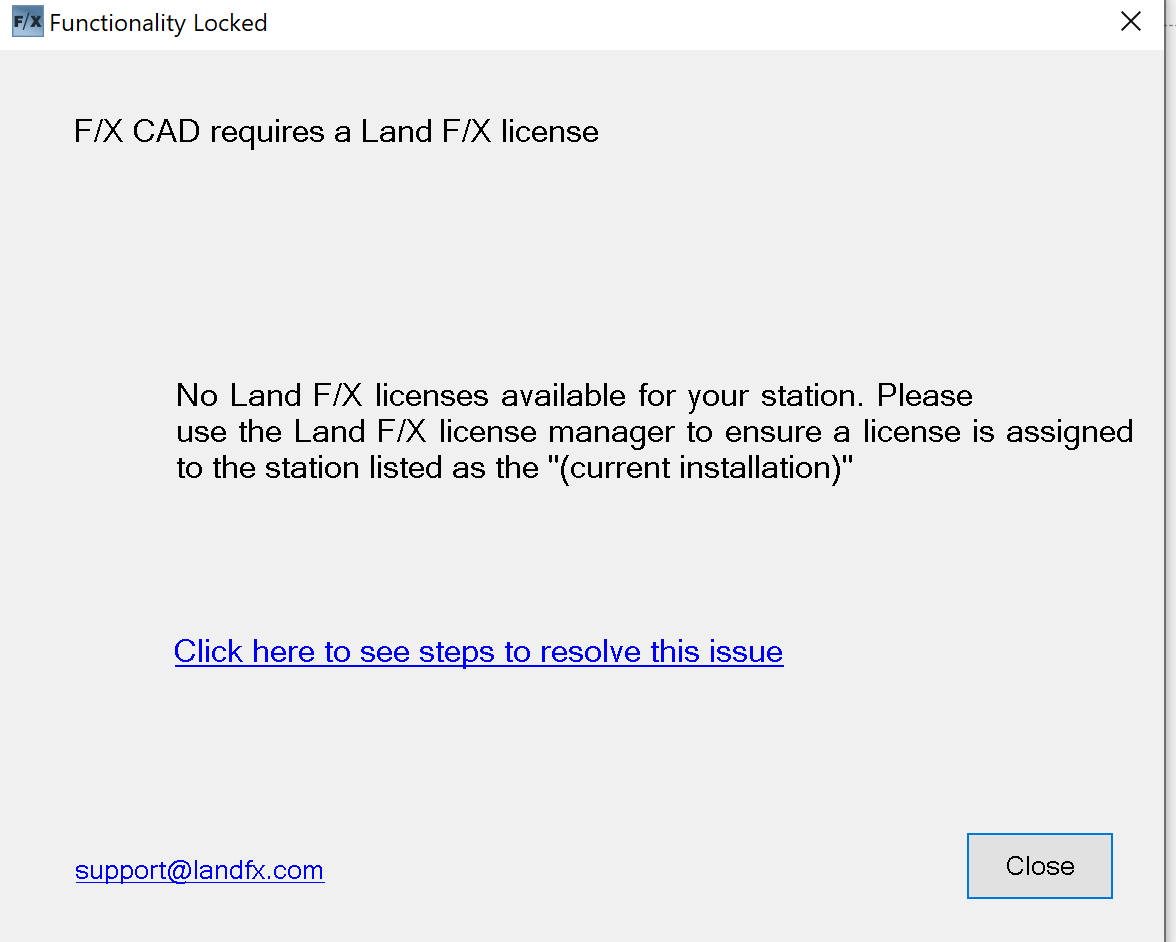
     

    FX CAD Requires a Land FX License
    FX CAD Cannot Function without A Land FX License


    If you saw this error when trying to plot to PDF, the Background Plotting setting may be the culprit. Follow the instructions below to turn it off.

    Did you receive the F/X CAD cannot function without Land F/X installed correctly error (pictured above) when you weren't trying to plot to PDF? You may need to complete a different set of steps to correct the error.


    Solution

    Open the Options dialog box:


    Manage ribbon, Options button

    Manage ribbon, Options button


    type Options in the Command line


    right-click in the Command line and selecting Options from the menu

    Tools pull-down menu

    Tools pull-down menu


    In the Options dialog box, select the Plot and Publish tab. In the Background Processing Options section, uncheck both boxes: Plotting and Publishing.


    Click OK to save your changes. You should now be able to plot to PDF without seeing an error message.

    Still getting the error message F/X CAD cannot function without Land F/X installed correctly? Solution
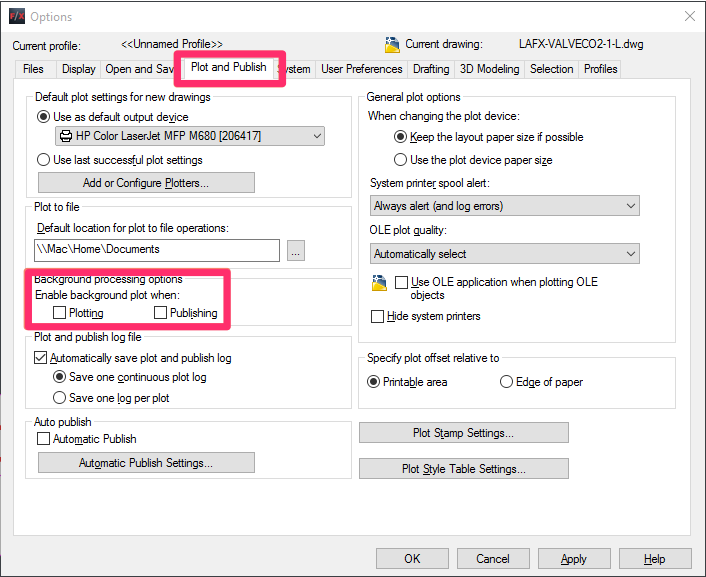
    Plot and Publish tab

    Contact

    • Land F/X
    • PMB 351 3940 Broad St. STE 7
      San Luis Obispo, CA 93401
    • +1 805-541-1003
    Email Logo Facebook Logo Instagram Logo LinkedIn Logo
    Land F/X Logo

    Our software tailors AutoCAD®, Revit®, SketchUp®, and Rhino® to the needs of landscape architects, irrigation designers, and other professionals. We automate your most tedious tasks and ensure accuracy, giving you more time to design.

    • Portal
    • Products
    • Support
    • Videos
    • Who We Are