Land F/X
  • Portal
  • Products
    • Detail F/X
      • Product
      • Features
      • Trial
      • Purchase
    • Planting F/X
      • Product
      • Features
      • Trial
      • Purchase
    • Irrigation F/X
      • Product
      • Features
      • Trial
      • Purchase
    • F/X CAD
    • Plugin for Revit®
    • Plugin for SketchUp®
    • Plugin for Rhino®
    • Site & Hardscape
    • Lighting
    • Manufacturer Connection
    • Academic
    • Purchase
  • Support
    • Knowledge Base
    • Documentation
    • Submit Ticket
    • Updates
    • Forum
    • Install
  • Videos
    • Power Tips
    • Webinars
    • Podcasts
  • Who We Are
    • Contact Us
    • Careers
    • Gallery
    • News
Land F/X
  • Portal
  • Products
    • Detail F/X
      • Product
      • Features
      • Trial
      • Purchase
    • Planting F/X
      • Product
      • Features
      • Trial
      • Purchase
    • Irrigation F/X
      • Product
      • Features
      • Trial
      • Purchase
    • F/X CAD
    • Plugin for Revit®
    • Plugin for SketchUp®
    • Plugin for Rhino®
    • Site & Hardscape
    • Lighting
    • Manufacturer Connection
    • Academic
    • Purchase
  • Support
    • Knowledge Base
    • Documentation
    • Submit Ticket
    • Updates
    • Forum
    • Install
  • Videos
    • Power Tips
    • Webinars
    • Podcasts
  • Who We Are
    • Contact Us
    • Careers
    • Gallery
    • News
  1. Home
  2. Knowledge Base
  3. F/X CAD & AutoCAD
  4. ACAD Ribbons, Menus & Palettes
  5. Load AutoCAD (ACAD) Menus

    Load AutoCAD (ACAD) Menus

    Updated on: April 25, 2022

    Issue

    You're missing the ACAD menus from the Loaded Customization Groups,


    or


    The AutoCAD ribbons or menus are missing from your CAD interface.


    Cause

    The AutoCAD (ACAD) ribbons can become unloaded from the Loaded Customization Groups for a number of reasons, requiring you to reload them.


    If you're missing your AutoCAD ribbons but you can see an ACAD entry in the list pictured to the right, you may simply need to unload your ACAD menus and reload them.
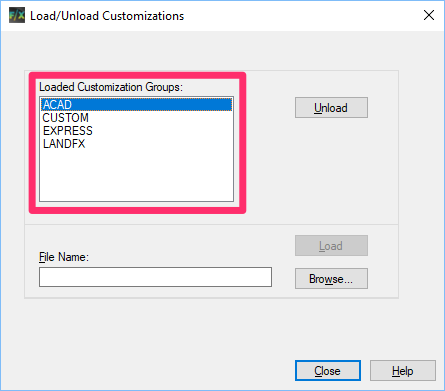
    Unload ACAD menus


    Solution


    MENULOAD

    Type MENULOAD in the Command line and press Enterto view your loaded menus.


    If your menus are loaded correctly, the Loaded Customization Groups list should include the ACAD and LANDFX menus, as pictured to the right.


    Load the ACAD Menus


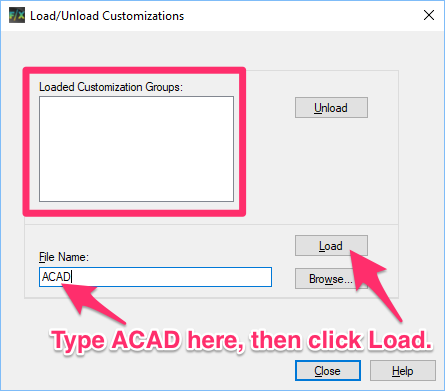
    If the ACAD entry is missing from this list, or if the list is blank (as pictured below), you'll need to load your ACAD menus.


    Load ACAD Menus

    To load your ACAD menus, simply type ACAD in the File Name field.


    Then click Load.


    You may need to reload your Land F/X menus at this point.


    If you still don't see your ACAD menus in the list, you'll need to revert the acad.cuix.bak file.


    Unload and Reload the ACAD Menus

    In some cases, even if you see ACAD in the list of loaded menus, you may need to unload and then reload your ACAD menus.


    To unload your ACAD menus, highlight ACAD in the Loaded Customization Groups and click Unload.

    Loaded Customization Groups


    Loaded Customization Groups

    The Loaded Customization Groups list should now be empty.

    If you still see anything listed in the Loaded Customization Groups, select it and click Unload. You'll need to repeat this step for each menu you still see loaded here at this point.


    Once the list of menus is completely empty, type ACAD in the File Name field. Than click Load.


    Your AutoCAD menus will now be reloaded.


    Menus still not reloading?


    1. Follow our steps to locate the ACAD.cuix file path.


    2. Copy and paste that file path into the File Name field. Then click Load again.
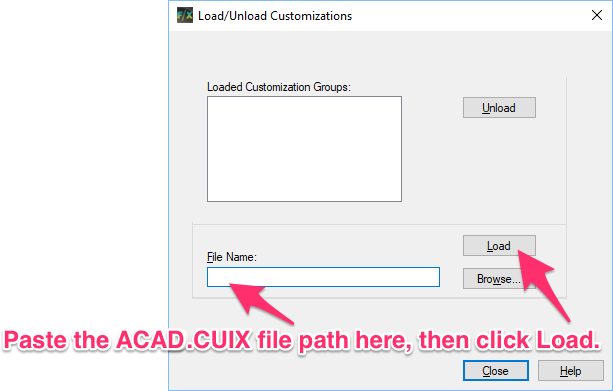
    Copy and paste that file path


    Express menu still missing?

    In some rare cases, the Express menu can disappear from your menus, and reloading the ACAD menus won't bring it back.


    In this case, you can reload your Express Tools:


    Type ACETMAIN in the File Name field of the Load/Unload Customizations dialog box.


    Then click Load.

    ACETMAIN


    ACAD menus still not loading?


    1. Follow our instructions to revert/restore the file acad.bak.cuix.


    2. Load the Land F/X menus. Land F/X should now work correctly.

    Contact

    • Land F/X
    • PMB 351 3940 Broad St. STE 7
      San Luis Obispo, CA 93401
    • +1 805-541-1003
    Email Logo Facebook Logo Instagram Logo LinkedIn Logo
    Land F/X Logo

    Our software tailors AutoCAD®, Revit®, SketchUp®, and Rhino® to the needs of landscape architects, irrigation designers, and other professionals. We automate your most tedious tasks and ensure accuracy, giving you more time to design.

    • Portal
    • Products
    • Support
    • Videos
    • Who We Are