Land F/X
  • Portal
  • Products
  • Support
  • Videos
  • Who We Are
  • Trial
  • Purchase
Land F/X
  • Portal
    • Dashboard
    • Account
    • Licenses
    • Data
    • Support
  • Products
    • Detail F/X
      • Product
      • Features
      • Trial
      • Purchase
    • Planting F/X
      • Product
      • Features
      • Trial
      • Purchase
    • Irrigation F/X
      • Product
      • Features
      • Trial
      • Purchase
    • F/X CAD
    • Plugin for Revit®
    • Plugin for SketchUp®
    • Plugin for Rhino®
    • Site & Hardscape
    • Lighting
    • Manufacturer Connection
    • Academic
    • Purchase
  • Support
    • Knowledge Base
    • Documentation
    • Submit Ticket
    • Updates
    • Forum
    • Install
  • Videos
    • Power Tips
    • Webinars
  • Who We Are
    • Contact Us
    • Careers
    • Gallery
    • News
  1. Knowledge Base
  2. F/X CAD & AutoCAD
  3. ACAD Ribbons, Menus & Palettes
  4. Layers and Layer Columns Not Visible in Layer Properties Manager

Layers and Layer Columns Not Visible in Layer Properties Manager

Issue

You are unable to see your layers in the Layer Properties Manager. All layers may be appearing as blank with no descriptions, and you might only be able to see one of the columns (as in the image below). In this example, the Status column is expanded across the entire screen, leaving no room for the other columns.
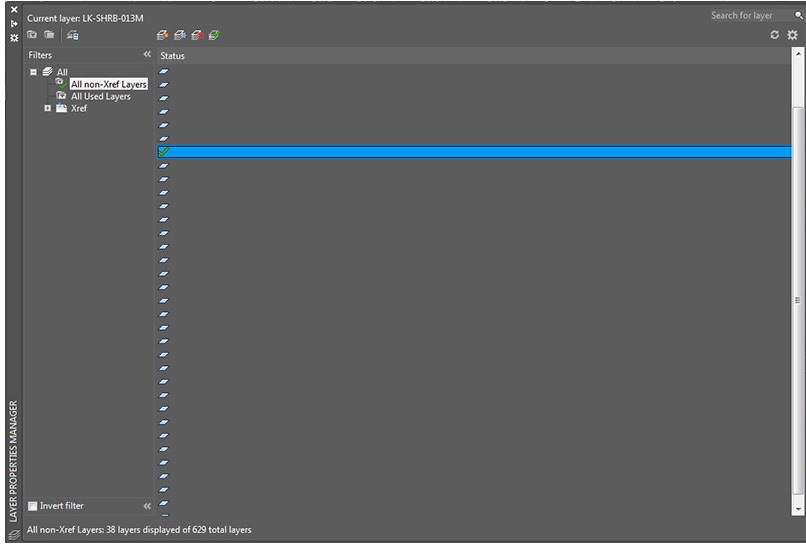
 

Layer Properties Manager empty


Cause

Something has gone awry with the columns settings in the Layer Properties Manager. Fortunately, it's a quick fix.


Solution

1. Right-click within the header area where your column name is listed.
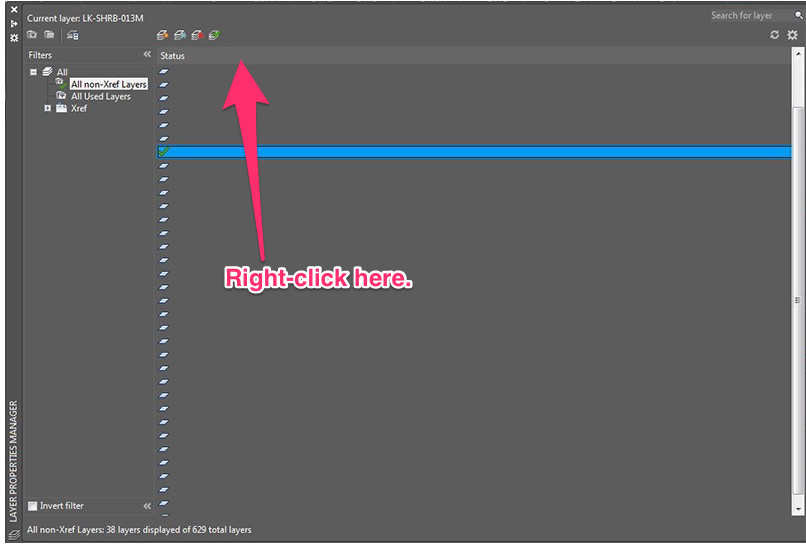
 

Right click within the header area


2. Select Optimize all columns from the menu that opens.


The columns should now be listed normally in the Layer Properties Panel, and you should be able to see your layers and all descriptions.
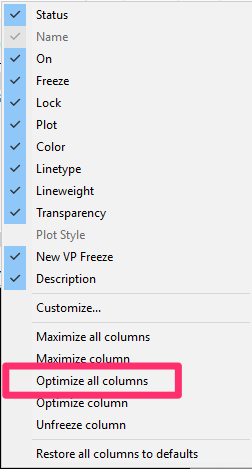
Optimize all columns

Contact

  • Land F/X
  • PMB 351 3940 Broad St. STE 7
    San Luis Obispo, CA 93401
  • +1 805-541-1003
Email Logo Facebook Logo Instagram Logo LinkedIn Logo
Land F/X Logo

Our software tailors AutoCAD®, Revit®, SketchUp®, and Rhino® to the needs of landscape architects, irrigation designers, and other professionals. We automate your most tedious tasks and ensure accuracy, giving you more time to design.

  • Portal
  • Products
  • Support
  • Videos
  • Who We Are