

Land F/X
  • Portal
  • Products
    • Detail F/X
      • Product
      • Features
      • Trial
      • Purchase
    • Planting F/X
      • Product
      • Features
      • Trial
      • Purchase
    • Irrigation F/X
      • Product
      • Features
      • Trial
      • Purchase
    • F/X CAD
    • Plugin for Revit®
    • Plugin for SketchUp®
    • Plugin for Rhino®
    • Site & Hardscape
    • Lighting
    • Manufacturer Connection
    • Academic
    • Purchase
  • Support
    • Knowledge Base
    • Documentation
    • Submit Ticket
    • Updates
    • Forum
    • Install
  • Videos
    • Power Tips
    • Webinars
    • Podcasts
  • Who We Are
    • Contact Us
    • Careers
    • Gallery
    • News
Land F/X
  • Portal
  • Products
    • Detail F/X
      • Product
      • Features
      • Trial
      • Purchase
    • Planting F/X
      • Product
      • Features
      • Trial
      • Purchase
    • Irrigation F/X
      • Product
      • Features
      • Trial
      • Purchase
    • F/X CAD
    • Plugin for Revit®
    • Plugin for SketchUp®
    • Plugin for Rhino®
    • Site & Hardscape
    • Lighting
    • Manufacturer Connection
    • Academic
    • Purchase
  • Support
    • Knowledge Base
    • Documentation
    • Submit Ticket
    • Updates
    • Forum
    • Install
  • Videos
    • Power Tips
    • Webinars
    • Podcasts
  • Who We Are
    • Contact Us
    • Careers
    • Gallery
    • News
  1. Home
  2. Knowledge Base
  3. Planting
  4. Presentation
  5. Plant Outlines Not Showing Up on Some of Your Trees or Shrubs

    Unable to See Hatches or Colorized Plants When Viewing 3D Within AutoCAD

    Updated on: May 18, 2022

    Issue

    In a planting plan created in a version of CAD that uses 3D modeling (standard AutoCAD or Civil 3D, for example, but not F/X CAD), you are unable to see hatches.


    Or you used our Color Render tool to colorize your planting plan but are unable to see the colorized plant symbols.


    Cause

    You most likely have a Visual Styles setting that's interfering with your ability to see colorized plants or hatches.


    Solution

    F/X CAD users:

    Export your drawing to a DFX, and it will automatically set the visual style back to wireframe, correcting the issue.


    AutoCAD (not F/X CAD) users:

    Open the View ribbon, and set the Visual Styles menu to 2D Wireframe, as pictured below.
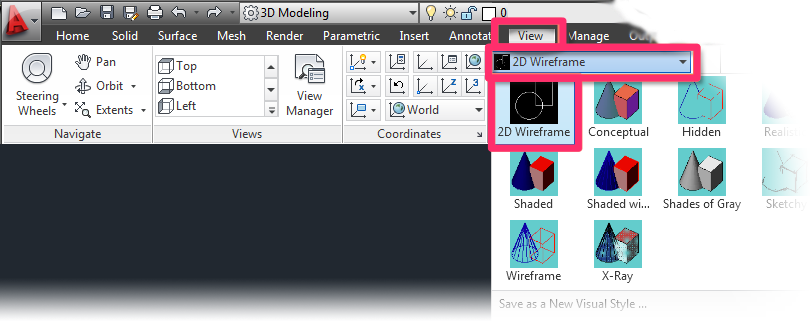
     

    View ribbon, Visual Styles menu, 2D Wireframe option


    You should now be able to see your hatches and/or colorized plants.

    Contact

    • Land F/X
    • PMB 351 3940 Broad St. STE 7
      San Luis Obispo, CA 93401
    • +1 805-541-1003
    Email Logo Facebook Logo Instagram Logo LinkedIn Logo
    Land F/X Logo

    Our software tailors AutoCAD®, Revit®, SketchUp®, and Rhino® to the needs of landscape architects, irrigation designers, and other professionals. We automate your most tedious tasks and ensure accuracy, giving you more time to design.

    • Portal
    • Products
    • Support
    • Videos
    • Who We Are