

Land F/X
  • Portal
  • Products
    • Detail F/X
      • Product
      • Features
      • Trial
      • Purchase
    • Planting F/X
      • Product
      • Features
      • Trial
      • Purchase
    • Irrigation F/X
      • Product
      • Features
      • Trial
      • Purchase
    • F/X CAD
    • Plugin for Revit®
    • Plugin for SketchUp®
    • Plugin for Rhino®
    • Site & Hardscape
    • Lighting
    • Manufacturer Connection
    • Academic
    • Purchase
  • Support
    • Knowledge Base
    • Documentation
    • Submit Ticket
    • Updates
    • Forum
    • Install
  • Videos
    • Power Tips
    • Webinars
    • Podcasts
  • Who We Are
    • Contact Us
    • Careers
    • Gallery
    • News
Land F/X
  • Portal
  • Products
    • Detail F/X
      • Product
      • Features
      • Trial
      • Purchase
    • Planting F/X
      • Product
      • Features
      • Trial
      • Purchase
    • Irrigation F/X
      • Product
      • Features
      • Trial
      • Purchase
    • F/X CAD
    • Plugin for Revit®
    • Plugin for SketchUp®
    • Plugin for Rhino®
    • Site & Hardscape
    • Lighting
    • Manufacturer Connection
    • Academic
    • Purchase
  • Support
    • Knowledge Base
    • Documentation
    • Submit Ticket
    • Updates
    • Forum
    • Install
  • Videos
    • Power Tips
    • Webinars
    • Podcasts
  • Who We Are
    • Contact Us
    • Careers
    • Gallery
    • News
  1. Home
  2. Knowledge Base
  3. Admin
  4. Errors: Admin
  5. This Workstation Does Not Appear to Be Configured Correctly for Land F/X (Opening AutoCAD or F/X CAD)

    Error: 'Write Error # ...' (Using a Land F/X Tool)

    Updated on: May 17, 2022

    Issue

    You saw an error message similar to the following when trying to use one of the Land F/X tools: Error: 'write error: #file "Z:\\data\\xml.cache\\COLR00j.htm'.
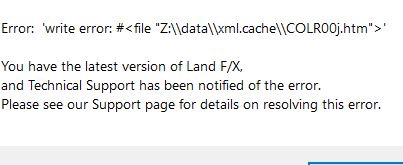
    Error: 'write error: #file 'Z:\\data\\xml.cache\\COLR00j.htm'


    We've seen this error pop up with the Color Render. However, it could result from the attempted use of any Land F/X tool that accesses items such as blocks and hatches from a folder.


    Cause

    The error is a result of the user not having proper permission to access the LandFX folder.


    Solution

    To resolve this issue, follow our steps to share the LandFX folder with the Land F/X user who received the error.

    Your office IT adminitrator should be made aware of the issue and should be involved in carrying out its solution, as it could be an indicator of an issue with a scope larger than Land F/X.

    Contact

    • Land F/X
    • PMB 351 3940 Broad St. STE 7
      San Luis Obispo, CA 93401
    • +1 805-541-1003
    Email Logo Facebook Logo Instagram Logo LinkedIn Logo
    Land F/X Logo

    Our software tailors AutoCAD®, Revit®, SketchUp®, and Rhino® to the needs of landscape architects, irrigation designers, and other professionals. We automate your most tedious tasks and ensure accuracy, giving you more time to design.

    • Portal
    • Products
    • Support
    • Videos
    • Who We Are