

Land F/X
  • Portal
  • Products
    • Detail F/X
      • Product
      • Features
      • Trial
      • Purchase
    • Planting F/X
      • Product
      • Features
      • Trial
      • Purchase
    • Irrigation F/X
      • Product
      • Features
      • Trial
      • Purchase
    • F/X CAD
    • Plugin for Revit®
    • Plugin for SketchUp®
    • Plugin for Rhino®
    • Site & Hardscape
    • Lighting
    • Manufacturer Connection
    • Academic
    • Purchase
  • Support
    • Knowledge Base
    • Documentation
    • Submit Ticket
    • Updates
    • Forum
    • Install
  • Videos
    • Power Tips
    • Webinars
    • Podcasts
  • Who We Are
    • Contact Us
    • Careers
    • Gallery
    • News
Land F/X
  • Portal
  • Products
    • Detail F/X
      • Product
      • Features
      • Trial
      • Purchase
    • Planting F/X
      • Product
      • Features
      • Trial
      • Purchase
    • Irrigation F/X
      • Product
      • Features
      • Trial
      • Purchase
    • F/X CAD
    • Plugin for Revit®
    • Plugin for SketchUp®
    • Plugin for Rhino®
    • Site & Hardscape
    • Lighting
    • Manufacturer Connection
    • Academic
    • Purchase
  • Support
    • Knowledge Base
    • Documentation
    • Submit Ticket
    • Updates
    • Forum
    • Install
  • Videos
    • Power Tips
    • Webinars
    • Podcasts
  • Who We Are
    • Contact Us
    • Careers
    • Gallery
    • News
  1. Home
  2. Knowledge Base
  3. Site & Details
  4. Errors: Site & Details
  5. Cannot Process Multiple Boundaries Because the Outer Polyline Includes Loops (Using the Multiple Option with a Hatch)

    []

    Cannot Process Multiple Boundaries Because the Outer Polyline Includes Loops (Using the Multiple Option with a Hatch)

    Updated on: May 26, 2022

    Issue

    You saw the following error message when attempting to exclude internal areas from a hatch using the Multiple option:

    Cannot process multiple boundaries because the outer polyline includes loops.

    Try redrawing the polyline boundary without loops or self intersections.

    Would you like to see more information?

    Cannot process multiple boundaries because the outer polyline includes loops


    You might be seeing this error when attempting to exclude internal objects from a planting (groundcover), site, hardscape, or irrigation hatch.


    Cause

    The outer boundary of the hatched area includes one or more loops or self intersections, which can easily be added accidentally to hastily drawing polylines. The Multiple option for excluding internal objects from hatches works by converting this outer polyline boundary of the hatched area into a Region.


    If the outer boundary does include loops, it cannot be converted into a Region, and the Multiple option will fail as a result, which will in turn apply the hatch to the internal objects you wanted to exclude.


    Solution

    For the Multiple option to work correctly, you'll need to redraw the polyline boundary of the hatched area so it doesn't include loops.
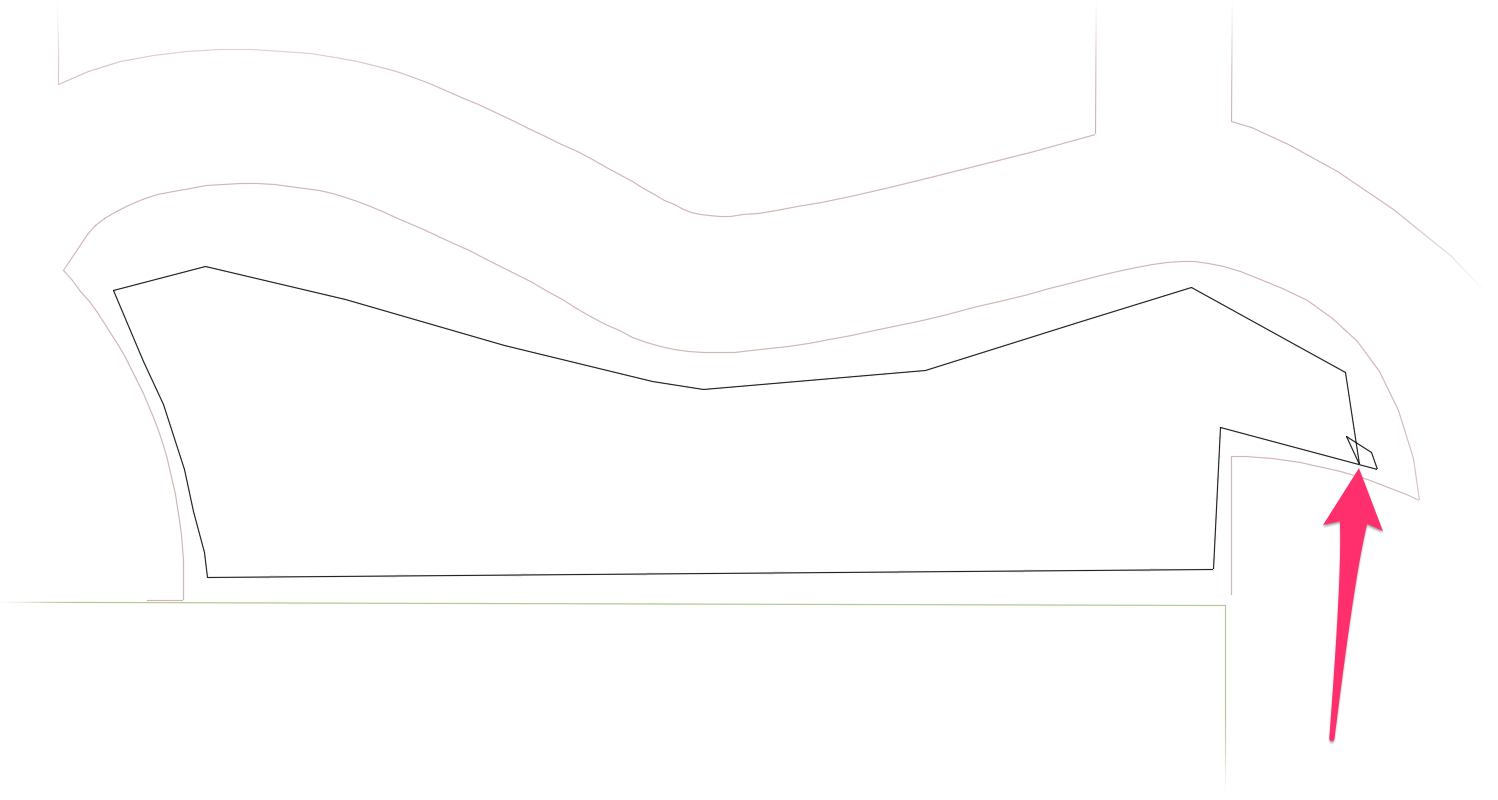


    Redraw polyline hatch boundary to not include loops

    Note that loops in polyline boundaries can be difficult to detect. You'll often need to zoom in to see them, as in the example to the left.


    After locating the loop in the hatch boundary, you can either move the vertices to remove the loop or completely redraw the polyline so it doesn't include the loop(s).


    Once you've removed the loop(s), the Multiple option should work correctly and exclude the internal objects from the hatch without generating the error.

    Contact

    • Land F/X
    • PMB 351 3940 Broad St. STE 7
      San Luis Obispo, CA 93401
    • +1 805-541-1003
    Email Logo Facebook Logo Instagram Logo LinkedIn Logo
    Land F/X Logo

    Our software tailors AutoCAD®, Revit®, SketchUp®, and Rhino® to the needs of landscape architects, irrigation designers, and other professionals. We automate your most tedious tasks and ensure accuracy, giving you more time to design.

    • Portal
    • Products
    • Support
    • Videos
    • Who We Are