

Land F/X
  • Portal
  • Products
    • Detail F/X
      • Product
      • Features
      • Trial
      • Purchase
    • Planting F/X
      • Product
      • Features
      • Trial
      • Purchase
    • Irrigation F/X
      • Product
      • Features
      • Trial
      • Purchase
    • F/X CAD
    • Plugin for Revit®
    • Plugin for SketchUp®
    • Plugin for Rhino®
    • Site & Hardscape
    • Lighting
    • Manufacturer Connection
    • Academic
    • Purchase
  • Support
    • Knowledge Base
    • Documentation
    • Submit Ticket
    • Updates
    • Forum
    • Install
  • Videos
    • Power Tips
    • Webinars
    • Podcasts
  • Who We Are
    • Contact Us
    • Careers
    • Gallery
    • News
Land F/X
  • Portal
  • Products
    • Detail F/X
      • Product
      • Features
      • Trial
      • Purchase
    • Planting F/X
      • Product
      • Features
      • Trial
      • Purchase
    • Irrigation F/X
      • Product
      • Features
      • Trial
      • Purchase
    • F/X CAD
    • Plugin for Revit®
    • Plugin for SketchUp®
    • Plugin for Rhino®
    • Site & Hardscape
    • Lighting
    • Manufacturer Connection
    • Academic
    • Purchase
  • Support
    • Knowledge Base
    • Documentation
    • Submit Ticket
    • Updates
    • Forum
    • Install
  • Videos
    • Power Tips
    • Webinars
    • Podcasts
  • Who We Are
    • Contact Us
    • Careers
    • Gallery
    • News
  1. Home
  2. Knowledge Base
  3. Site & Details
  4. Adding & Placing Details
  5. Details Missing from Both the Detail Explorer and Detail Manager

    []

    Detail Library on Shared Online Folder Location: All Custom Details Missing

    Updated on: March 12, 2026

    Issue

    Your detail library is in a shared online folder location, and you can only see our default details. Details you've saved into the system are missing from your detail folder. You may be using one of the following services for your shared online location:

    • Dropbox
    • Google Drive (Note: Google File Stream is now known as Google Drive. If you have Google File Stream installed, it will still work with Land F/X.)
    • Box
    • SugarSync
    • Egnyte


    Cause

    The file that allows your details to be stored in this folder has become corrupted.


    Solution


    Open the folder LandFX\Details.


    Right-click the file _index.xml.


    Select the option to Restore previous versions from the menu that opens.
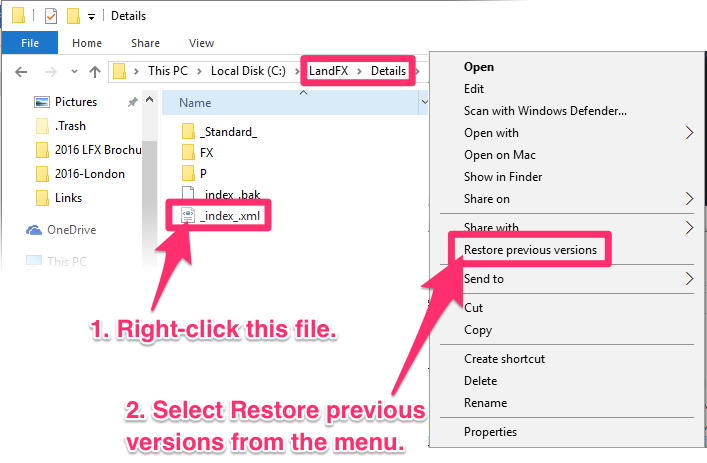
    Restore previous versions menu option


    If a previous version of this file exists, it will load, and your details should repopulate in your details folder on Dropbox.


    If you do not have a previous version of this file, you will need to resave all your details into the detail library using our Save Detail tool.

    Contact

    • Land F/X
    • PMB 351 3940 Broad St. STE 7
      San Luis Obispo, CA 93401
    • +1 805-541-1003
    Email Logo Facebook Logo Instagram Logo LinkedIn Logo
    Land F/X Logo

    Our software tailors AutoCAD®, Revit®, SketchUp®, and Rhino® to the needs of landscape architects, irrigation designers, and other professionals. We automate your most tedious tasks and ensure accuracy, giving you more time to design.

    • Portal
    • Products
    • Support
    • Videos
    • Who We Are