Land F/X
  • Portal
  • Products
    • Detail F/X
      • Product
      • Features
      • Trial
      • Purchase
    • Planting F/X
      • Product
      • Features
      • Trial
      • Purchase
    • Irrigation F/X
      • Product
      • Features
      • Trial
      • Purchase
    • F/X CAD
    • Plugin for Revit®
    • Plugin for SketchUp®
    • Plugin for Rhino®
    • Site & Hardscape
    • Lighting
    • Manufacturer Connection
    • Academic
    • Purchase
  • Support
    • Knowledge Base
    • Documentation
    • Submit Ticket
    • Updates
    • Forum
    • Install
  • Videos
    • Power Tips
    • Webinars
    • Podcasts
  • Who We Are
    • Contact Us
    • Careers
    • Gallery
    • News
Land F/X
  • Portal
  • Products
    • Detail F/X
      • Product
      • Features
      • Trial
      • Purchase
    • Planting F/X
      • Product
      • Features
      • Trial
      • Purchase
    • Irrigation F/X
      • Product
      • Features
      • Trial
      • Purchase
    • F/X CAD
    • Plugin for Revit®
    • Plugin for SketchUp®
    • Plugin for Rhino®
    • Site & Hardscape
    • Lighting
    • Manufacturer Connection
    • Academic
    • Purchase
  • Support
    • Knowledge Base
    • Documentation
    • Submit Ticket
    • Updates
    • Forum
    • Install
  • Videos
    • Power Tips
    • Webinars
    • Podcasts
  • Who We Are
    • Contact Us
    • Careers
    • Gallery
    • News
  1. Home
  2. Knowledge Base
  3. Installation Troubleshooting & Errors
  4. MySQL
  5. Disable the MySQL Service

    Disable the MySQL Service

    Updated on: May 09, 2022

    Issue

    You need to disable the MySQL service.


    Solution

    Open your Control Panel. On the top right, change the View By dropdown menu to Small Icons:


    Control Panel, View By menu, Small Icons option


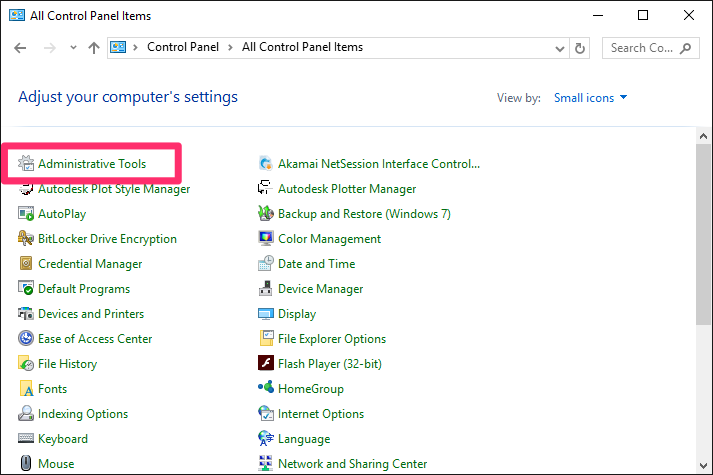
    Click Administrative Tools:


    Control Panel, Administrative Tools option


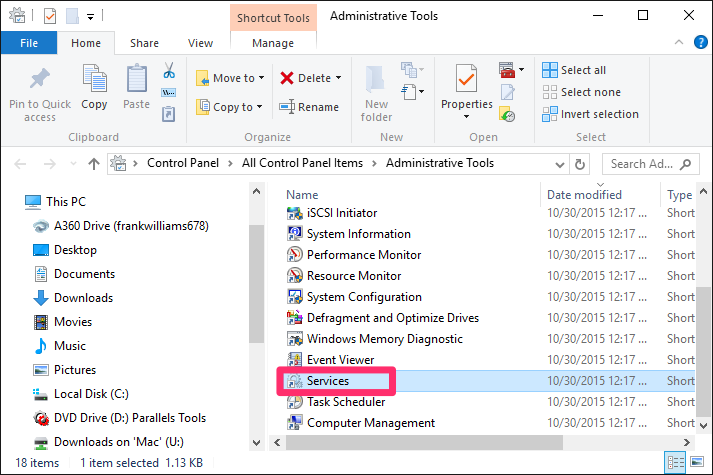
    Click Services:


    Administrative Tools dialog box, Services option


    Scroll down through this list, and double-click on MySQL:


    Services screen, MySQL option


    Now select Disabled from the pull-down menu and click Stop:


    MySQL Properties dialog box, Startup Type menu, Disabled option, Stop button


    Have you moved your LandFX folder to a shared online location using a service such as Dropbox?

    If so, you'll need to rename your folder. Navigate to the root of your C: drive in Windows File Explorer, and rename the LandFX folder to Landfxold.


    Renaming the LandFX folder


    That's it! Your old Single-User installation is now turned off and won't cause any conflicts.

    Contact

    • Land F/X
    • PMB 351 3940 Broad St. STE 7
      San Luis Obispo, CA 93401
    • +1 805-541-1003
    Email Logo Facebook Logo Instagram Logo LinkedIn Logo
    Land F/X Logo

    Our software tailors AutoCAD®, Revit®, SketchUp®, and Rhino® to the needs of landscape architects, irrigation designers, and other professionals. We automate your most tedious tasks and ensure accuracy, giving you more time to design.

    • Portal
    • Products
    • Support
    • Videos
    • Who We Are