Land F/X
  • Portal
  • Products
    • Detail F/X
      • Product
      • Features
      • Trial
      • Purchase
    • Planting F/X
      • Product
      • Features
      • Trial
      • Purchase
    • Irrigation F/X
      • Product
      • Features
      • Trial
      • Purchase
    • F/X CAD
    • Plugin for Revit®
    • Plugin for SketchUp®
    • Plugin for Rhino®
    • Site & Hardscape
    • Lighting
    • Manufacturer Connection
    • Academic
    • Purchase
  • Support
    • Knowledge Base
    • Documentation
    • Submit Ticket
    • Updates
    • Forum
    • Install
  • Videos
    • Power Tips
    • Webinars
    • Podcasts
  • Who We Are
    • Contact Us
    • Careers
    • Gallery
    • News
Land F/X
  • Portal
  • Products
    • Detail F/X
      • Product
      • Features
      • Trial
      • Purchase
    • Planting F/X
      • Product
      • Features
      • Trial
      • Purchase
    • Irrigation F/X
      • Product
      • Features
      • Trial
      • Purchase
    • F/X CAD
    • Plugin for Revit®
    • Plugin for SketchUp®
    • Plugin for Rhino®
    • Site & Hardscape
    • Lighting
    • Manufacturer Connection
    • Academic
    • Purchase
  • Support
    • Knowledge Base
    • Documentation
    • Submit Ticket
    • Updates
    • Forum
    • Install
  • Videos
    • Power Tips
    • Webinars
    • Podcasts
  • Who We Are
    • Contact Us
    • Careers
    • Gallery
    • News
  1. Home
  2. Knowledge Base
  3. Irrigation
  4. Errors: Irrigation
  5. Pressure Available at the POC Has Been Exceeded / Unable to Size Mainline (Sizing the Mainline)

    []

    Unsizeable Valve Encountered. Flow Velocity Has Been Reduced to Minimum, and Friction Loss Still Exceeds Allowable Pressure Variation

    Updated on: May 27, 2022

    Issue

    When attempting to size all lateral pipes in your irrigation design, you saw the following error message:


    Unsizeable valve encountered. Flow velocity has been reduced to minimum, and friction loss still exceeds allowable pressure variation. Erroring out.
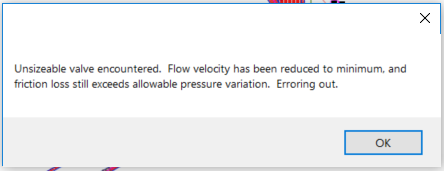
     

    Unsizeable valve encountered. Flow velocity has been reduced to minimum, and friction loss still exceeds allowable pressure variation. Erroring out.
    Size All Lateral Pipes dialog box

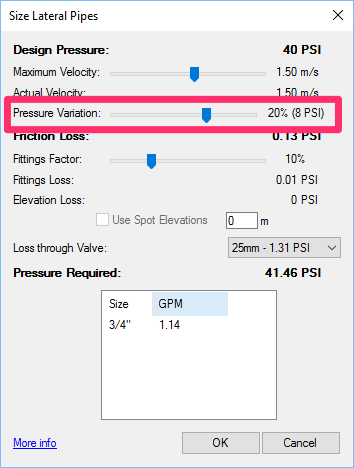
    What is pressure variation?


    Size Lateral Pipes dialog box, Pressure Variation setting

    The Pressure Variation setting in the Size Lateral Pipes dialog box allows you to set a value for how much pressure you will allow your irrigation system to lose.


    When sizing the lateral pipe for only one valve at a time, you'll see the Pressure Variation as both a percentage of the current Design Pressure listed at the top of the dialog box, and as the actual pressure loss that will occur based on this percentage. If sizing all valves, you'll only see the percentage.


    This setting works in conjunction with the Maximum Velocity setting. If the friction loss is larger than the allowable pressure variation, the system will reduce the velocity.


    As soon as the friction loss pushes past the minimum allowed velocity (3fps or 1m/s for metric), the pressure variation will auto-set to OFF.


    Cause

    One or more valves in your design have an excessively high Friction Loss setting. You should be able to override this issue by disabling the Pressure Variation setting when sizing your laterals.


    Solution

    Open our Size Laterals tool again.


    Size all valves at a time, but set the Pressure Variation all the way to the left to Off, as pictured to the right.


    The system should size without generating the error.
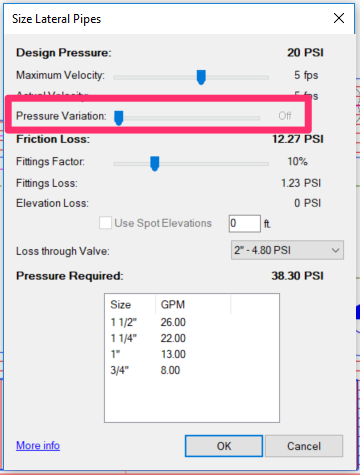
    Size Lateral Pipes dialog box, Pressure Variation setting turned completely off


    Need to investigate the individual valve(s) causing the issue?

    If you want, you can also check the settings of the valve(s) generating the error. Here's how:


    Click OK in the error message.

    Error message, OK button


    Zoomed-in valve that is causing the error

    The system should zoom in on the valve in your design that is causing the issue (as in the example to the left).


    Did you only zoom in to a portion of your plan, rather than a specific valve? Here's what to do.
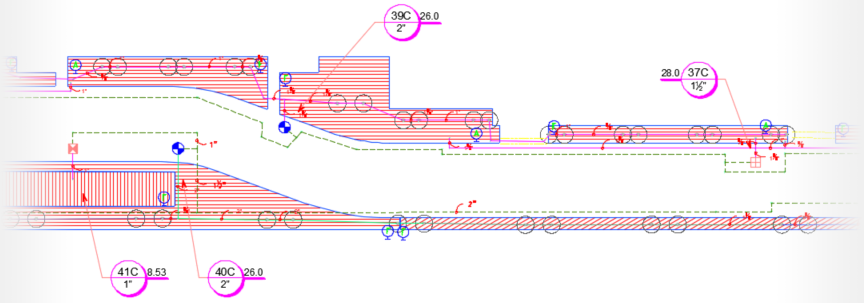
     

    Zoom in to a portion of plan rather than specific valve


    Press the F2 key to pull up the command list (pictured to the right).


    Look for the last valve listed – in this example, valve 40C. Take note of this valve – it's the valve you'll need to size individually using the steps below.
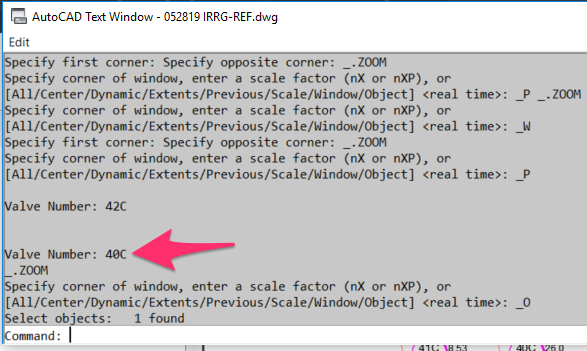
    Last valve listed in command history


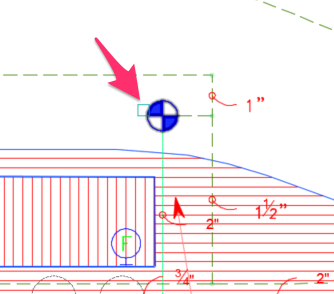
    Select only the valve causing the issue


    Open our Size Laterals tool again.


    This time, use the pickbox to select only the valve causing the issue, as pictured to the left. (Do not size all valves at a time.)


    When the dialog box opens, the pressure variation will be turned off, allowing you to start altering the velocity to determine the sizes and friction loss that are acceptable to you.


    Size your laterals again. This time, take care to do one of the following:

    • Size all laterals at a time, making sure to set the Pressure Variation to Off, as pictured to the right, or ...


    • Size each of your valves individually. For instructions, see our documentation on sizing one valve at a time.
    Size Lateral Pipes dialog box showing Maximum Velocity slide, Pressure Variation setting turned off, and Friction Loss value

    Contact

    • Land F/X
    • PMB 351 3940 Broad St. STE 7
      San Luis Obispo, CA 93401
    • +1 805-541-1003
    Email Logo Facebook Logo Instagram Logo LinkedIn Logo
    Land F/X Logo

    Our software tailors AutoCAD®, Revit®, SketchUp®, and Rhino® to the needs of landscape architects, irrigation designers, and other professionals. We automate your most tedious tasks and ensure accuracy, giving you more time to design.

    • Portal
    • Products
    • Support
    • Videos
    • Who We Are