

Land F/X
  • Portal
  • Products
    • Detail F/X
      • Product
      • Features
      • Trial
      • Purchase
    • Planting F/X
      • Product
      • Features
      • Trial
      • Purchase
    • Irrigation F/X
      • Product
      • Features
      • Trial
      • Purchase
    • F/X CAD
    • Plugin for Revit®
    • Plugin for SketchUp®
    • Plugin for Rhino®
    • Site & Hardscape
    • Lighting
    • Manufacturer Connection
    • Academic
    • Purchase
  • Support
    • Knowledge Base
    • Documentation
    • Submit Ticket
    • Updates
    • Forum
    • Install
  • Videos
    • Power Tips
    • Webinars
    • Podcasts
  • Who We Are
    • Contact Us
    • Careers
    • Gallery
    • News
Land F/X
  • Portal
  • Products
    • Detail F/X
      • Product
      • Features
      • Trial
      • Purchase
    • Planting F/X
      • Product
      • Features
      • Trial
      • Purchase
    • Irrigation F/X
      • Product
      • Features
      • Trial
      • Purchase
    • F/X CAD
    • Plugin for Revit®
    • Plugin for SketchUp®
    • Plugin for Rhino®
    • Site & Hardscape
    • Lighting
    • Manufacturer Connection
    • Academic
    • Purchase
  • Support
    • Knowledge Base
    • Documentation
    • Submit Ticket
    • Updates
    • Forum
    • Install
  • Videos
    • Power Tips
    • Webinars
    • Podcasts
  • Who We Are
    • Contact Us
    • Careers
    • Gallery
    • News
  1. Home
  2. Knowledge Base
  3. Irrigation
  4. Pipe Sizing
  5. Knowledge Base
  6. Irrigation
  7. Errors: Irrigation
  8. Divide by Zero Error (Sizing Lateral Pipes, Taking a Flow Total, or Using Highlight Station or Edit Equipment)

    []

    Pipe Data Defaults Not Saving or Sticking

    Updated on: May 27, 2022

    Issue


    You tried to make changes to the Pipe Data Defaults in the Irrigation Preferences, but those changes are not sticking in the current project.

    The Pipe Data Defaults feature is designed to take all the settings you've configured using our Pipe Data tool and make those settings the default for the current Preference Set.

    Irrigation Preferences, Pipe Data Defaults button


    Cause

    Changing the Pipe Data defaults will not affect the Pipe Data options in an already-created project.


    Solution

    Make your changes to the Pipe Data defaults to affect the settings you want to use in new projects.
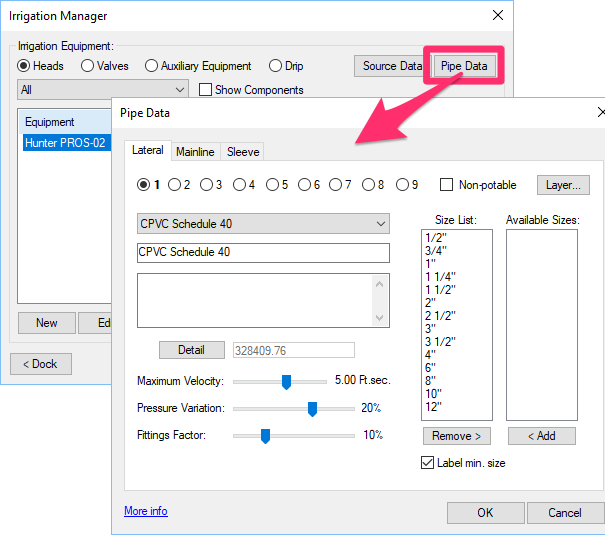


    Opening the Pipe Data dialog box by clicking the Pipe Data button in the Irrigation Manager

    To modify the Pipe Data on an existing drawing, make those changes from our actual Pipe Data tool, available from the Irrigation Manager.

    Contact

    • Land F/X
    • PMB 351 3940 Broad St. STE 7
      San Luis Obispo, CA 93401
    • +1 805-541-1003
    Email Logo Facebook Logo Instagram Logo LinkedIn Logo
    Land F/X Logo

    Our software tailors AutoCAD®, Revit®, SketchUp®, and Rhino® to the needs of landscape architects, irrigation designers, and other professionals. We automate your most tedious tasks and ensure accuracy, giving you more time to design.

    • Portal
    • Products
    • Support
    • Videos
    • Who We Are