

Land F/X
  • Portal
  • Products
    • Detail F/X
      • Product
      • Features
      • Trial
      • Purchase
    • Planting F/X
      • Product
      • Features
      • Trial
      • Purchase
    • Irrigation F/X
      • Product
      • Features
      • Trial
      • Purchase
    • F/X CAD
    • Plugin for Revit®
    • Plugin for SketchUp®
    • Plugin for Rhino®
    • Site & Hardscape
    • Lighting
    • Manufacturer Connection
    • Academic
    • Purchase
  • Support
    • Knowledge Base
    • Documentation
    • Submit Ticket
    • Updates
    • Forum
    • Install
  • Videos
    • Power Tips
    • Webinars
    • Podcasts
  • Who We Are
    • Contact Us
    • Careers
    • Gallery
    • News
Land F/X
  • Portal
  • Products
    • Detail F/X
      • Product
      • Features
      • Trial
      • Purchase
    • Planting F/X
      • Product
      • Features
      • Trial
      • Purchase
    • Irrigation F/X
      • Product
      • Features
      • Trial
      • Purchase
    • F/X CAD
    • Plugin for Revit®
    • Plugin for SketchUp®
    • Plugin for Rhino®
    • Site & Hardscape
    • Lighting
    • Manufacturer Connection
    • Academic
    • Purchase
  • Support
    • Knowledge Base
    • Documentation
    • Submit Ticket
    • Updates
    • Forum
    • Install
  • Videos
    • Power Tips
    • Webinars
    • Podcasts
  • Who We Are
    • Contact Us
    • Careers
    • Gallery
    • News
  1. Home
  2. Knowledge Base
  3. Irrigation
  4. Piping
  5. Pressure Loss for the Master Valve Is Not Appearing in the Critical Analysis

    []

    Pickbox and Pipe Extension Reacting Differently With Different Heads

    Updated on: August 05, 2022

    Issue

    When drawing lateral pipe, you've noticed that the pickbox and the pipe extension seem to be behaving differently depending on which head you select. The pipe seems to be "snapping" to a point outside the head, as pictured below. (You may only notice this issue when you have ORTHO turned on.)
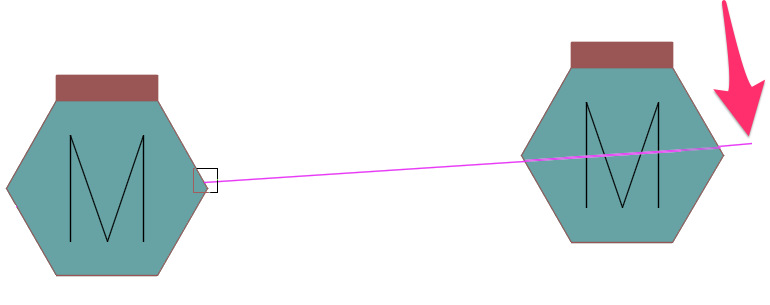
     

    Pickbox and pipe extension are behaving differently when you draw lateral pipe to different heads


    Cause

    You heads may have a Z elevation, which is causing the inaccuracy.


    Solution

    With the World Coordinate System (WCS) active, open the Properties panel by typing Properties in the Command line and pressing Enter.


    Click on one of the heads causing the issue


    Check the Position Z value under Geometry in the Properties dialog box.


    The value should be 0 (or 0.0, 0.00, 0.000, etc.).
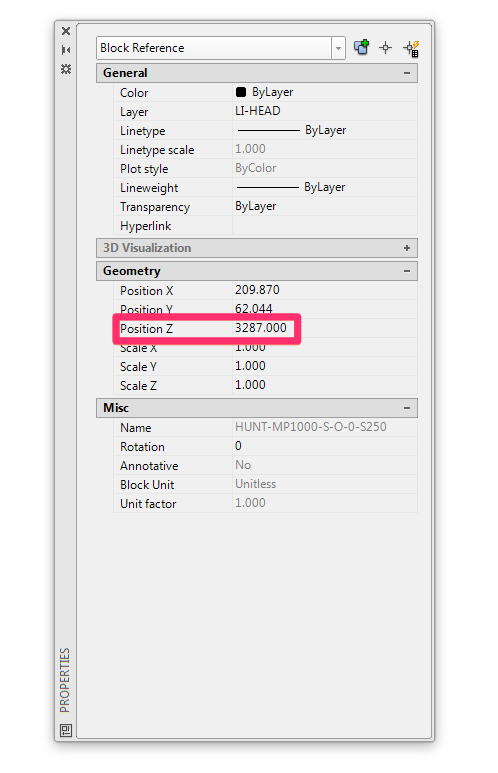
    Properties panel, Position Z entry


    If not, set the Z value to 0.


    Repeat these steps on each problematic head.


    To grab and troubleshoot all problematic heads at once, you can use the Select Similar command: Select one of the heads, right-click, and select the Select Similar option from the menu that opens. All heads of that same type will be selected. Now, when you complete the troubleshooting steps above, they will apply to all of the selected heads.

    Contact

    • Land F/X
    • PMB 351 3940 Broad St. STE 7
      San Luis Obispo, CA 93401
    • +1 805-541-1003
    Email Logo Facebook Logo Instagram Logo LinkedIn Logo
    Land F/X Logo

    Our software tailors AutoCAD®, Revit®, SketchUp®, and Rhino® to the needs of landscape architects, irrigation designers, and other professionals. We automate your most tedious tasks and ensure accuracy, giving you more time to design.

    • Portal
    • Products
    • Support
    • Videos
    • Who We Are