

Land F/X
  • Portal
  • Products
    • Detail F/X
      • Product
      • Features
      • Trial
      • Purchase
    • Planting F/X
      • Product
      • Features
      • Trial
      • Purchase
    • Irrigation F/X
      • Product
      • Features
      • Trial
      • Purchase
    • F/X CAD
    • Plugin for Revit®
    • Plugin for SketchUp®
    • Plugin for Rhino®
    • Site & Hardscape
    • Lighting
    • Manufacturer Connection
    • Academic
    • Purchase
  • Support
    • Knowledge Base
    • Documentation
    • Submit Ticket
    • Updates
    • Forum
    • Install
  • Videos
    • Power Tips
    • Webinars
    • Podcasts
  • Who We Are
    • Contact Us
    • Careers
    • Gallery
    • News
Land F/X
  • Portal
  • Products
    • Detail F/X
      • Product
      • Features
      • Trial
      • Purchase
    • Planting F/X
      • Product
      • Features
      • Trial
      • Purchase
    • Irrigation F/X
      • Product
      • Features
      • Trial
      • Purchase
    • F/X CAD
    • Plugin for Revit®
    • Plugin for SketchUp®
    • Plugin for Rhino®
    • Site & Hardscape
    • Lighting
    • Manufacturer Connection
    • Academic
    • Purchase
  • Support
    • Knowledge Base
    • Documentation
    • Submit Ticket
    • Updates
    • Forum
    • Install
  • Videos
    • Power Tips
    • Webinars
    • Podcasts
  • Who We Are
    • Contact Us
    • Careers
    • Gallery
    • News
  1. Home
  2. Knowledge Base
  3. Planting
  4. Presentation
  5. Plant Outlines Not Showing Up on Some of Your Trees or Shrubs

    []

    Plant Outlines Not Showing Up on Some of Your Trees or Shrubs

    Updated on: May 26, 2022

    Issue

    You added outlines to your trees and shrubs using our Plant Outlines tool, and the outlines aren't appearing around some of your plants.
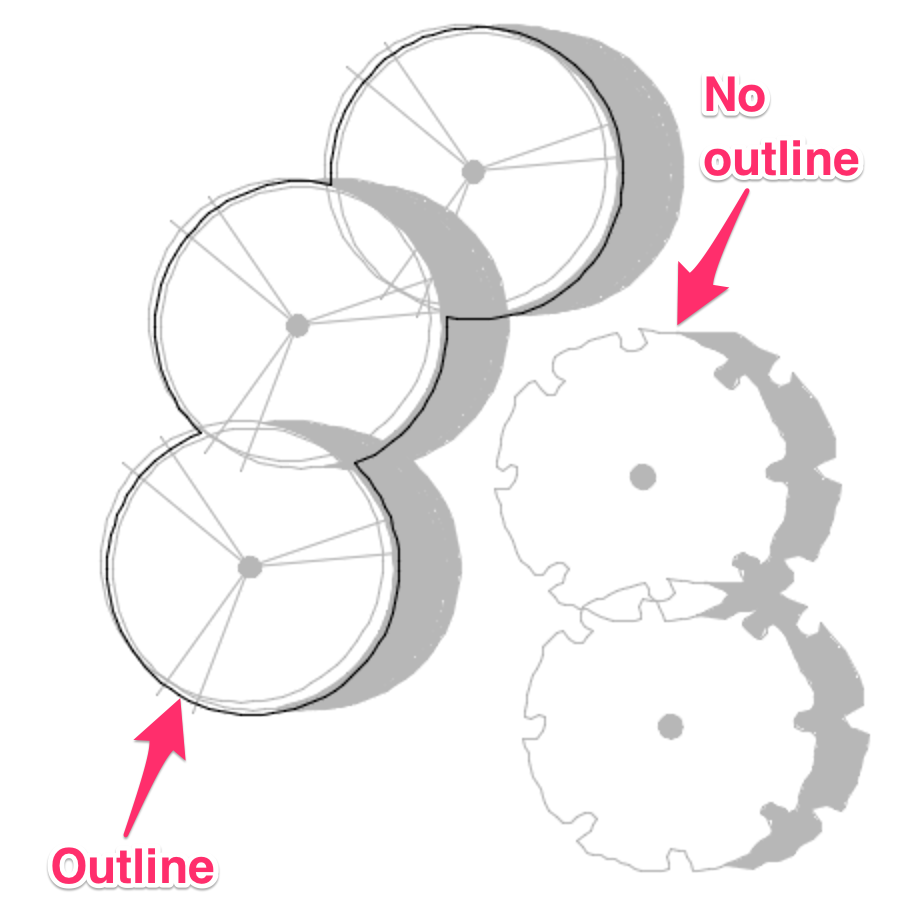
    Plant Outlines not appearing around plants


    Cause

    If you don't see an outline on one or more of your plants but other plants are outlined, it's a sign that the data has changed on the non-outlined plants since you've placed them.


    This issue can be a bigger sign that you are using one Land F/X project for multiple jobs – a practice we do not recommend.


    Solution
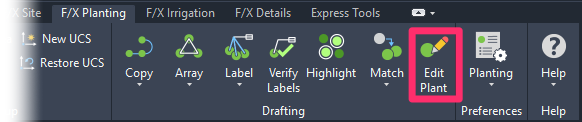
    F/X Planting ribbon, Edit Plant button

    Open our Edit Plant tool.


    Select a plant in your drawing that isn't outlined.


    In most cases, you'll only need to click OK in the Plant Info dialog box.

    Plant Info dialog box, OK button


    Outlines visible on plants


    You should now be able to see the outlines on all your plants.


    If not, you'll need to do some investigation about how the plant data has changed. You may need to remove the plant from your Land F/X project and add it back.

    In general, avoid using one Land F/X project for multiple jobs. We always recommend creating a new project for each new job. To avoid re-creating your plant palette each time you start a project, use project templates to keep master plant palettes.

    Contact

    • Land F/X
    • PMB 351 3940 Broad St. STE 7
      San Luis Obispo, CA 93401
    • +1 805-541-1003
    Email Logo Facebook Logo Instagram Logo LinkedIn Logo
    Land F/X Logo

    Our software tailors AutoCAD®, Revit®, SketchUp®, and Rhino® to the needs of landscape architects, irrigation designers, and other professionals. We automate your most tedious tasks and ensure accuracy, giving you more time to design.

    • Portal
    • Products
    • Support
    • Videos
    • Who We Are