

Land F/X
  • Portal
  • Products
    • Detail F/X
      • Product
      • Features
      • Trial
      • Purchase
    • Planting F/X
      • Product
      • Features
      • Trial
      • Purchase
    • Irrigation F/X
      • Product
      • Features
      • Trial
      • Purchase
    • F/X CAD
    • Plugin for Revit®
    • Plugin for SketchUp®
    • Plugin for Rhino®
    • Site & Hardscape
    • Lighting
    • Manufacturer Connection
    • Academic
    • Purchase
  • Support
    • Knowledge Base
    • Documentation
    • Submit Ticket
    • Updates
    • Forum
    • Install
  • Videos
    • Power Tips
    • Webinars
    • Podcasts
  • Who We Are
    • Contact Us
    • Careers
    • Gallery
    • News
Land F/X
  • Portal
  • Products
    • Detail F/X
      • Product
      • Features
      • Trial
      • Purchase
    • Planting F/X
      • Product
      • Features
      • Trial
      • Purchase
    • Irrigation F/X
      • Product
      • Features
      • Trial
      • Purchase
    • F/X CAD
    • Plugin for Revit®
    • Plugin for SketchUp®
    • Plugin for Rhino®
    • Site & Hardscape
    • Lighting
    • Manufacturer Connection
    • Academic
    • Purchase
  • Support
    • Knowledge Base
    • Documentation
    • Submit Ticket
    • Updates
    • Forum
    • Install
  • Videos
    • Power Tips
    • Webinars
    • Podcasts
  • Who We Are
    • Contact Us
    • Careers
    • Gallery
    • News
  1. Home
  2. Knowledge Base
  3. Admin
  4. Errors: Admin
  5. Knowledge Base
  6. Installation: Troubleshooting & Errors
  7. Errors: Installing Land F/X
  8. Error Opening Installation Log File (Installing the Land F/X Workstation Component)

    []

    Your Support for This Product Has Expired. This Feature Is Unavailable (Updating a Land F/X Plugin)

    Updated on: January 05, 2026

    Issue


    When updating one of our AutoCAD plugins, you saw the following error message:

    Your support for this product has expired. This feature is unavailable.
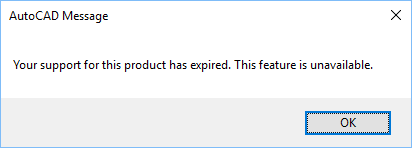
    Your support for this product has expired. This feature is unavailable.


    You are positive you're not expired (you paid your renewal fee within the past year).


    Cause


    Occasionally, you may receive this message when downloading the latest Land F/X update. The error is caused by a corrupt update file.

    If you are in fact expired, you can pay your renewal fee on our Purchase page.


    Solution

    1. Verify that your Support ID is shown correctly in the General Preferences screen.

    • If your Support ID is listed correctly (as a series of numbers and letters), skip to Step 3.
    • If your Support ID is showing as dashes or hyphens rather than numbers and letters, move on to Step 2.


    2. If you see dashes or hyphens instead of your Support ID:

    • Type REACTIVATE in the Command line and press Enter.
    • Enter your Support ID in the dialog box that opens, then restart CAD.
    • Still getting the error? Move on to Step 3.


    3. Follow our steps to restore the file landfx.vlx.bak. In most cases, we'll be aware of the issue and will build a patch into the ensuing update.

    Contact

    • Land F/X
    • PMB 351 3940 Broad St. STE 7
      San Luis Obispo, CA 93401
    • +1 805-541-1003
    Email Logo Facebook Logo Instagram Logo LinkedIn Logo
    Land F/X Logo

    Our software tailors AutoCAD®, Revit®, SketchUp®, and Rhino® to the needs of landscape architects, irrigation designers, and other professionals. We automate your most tedious tasks and ensure accuracy, giving you more time to design.

    • Portal
    • Products
    • Support
    • Videos
    • Who We Are