

Land F/X
  • Portal
  • Products
    • Detail F/X
      • Product
      • Features
      • Trial
      • Purchase
    • Planting F/X
      • Product
      • Features
      • Trial
      • Purchase
    • Irrigation F/X
      • Product
      • Features
      • Trial
      • Purchase
    • F/X CAD
    • Plugin for Revit®
    • Plugin for SketchUp®
    • Plugin for Rhino®
    • Site & Hardscape
    • Lighting
    • Manufacturer Connection
    • Academic
    • Purchase
  • Support
    • Knowledge Base
    • Documentation
    • Submit Ticket
    • Updates
    • Forum
    • Install
  • Videos
    • Power Tips
    • Webinars
    • Podcasts
  • Who We Are
    • Contact Us
    • Careers
    • Gallery
    • News
Land F/X
  • Portal
  • Products
    • Detail F/X
      • Product
      • Features
      • Trial
      • Purchase
    • Planting F/X
      • Product
      • Features
      • Trial
      • Purchase
    • Irrigation F/X
      • Product
      • Features
      • Trial
      • Purchase
    • F/X CAD
    • Plugin for Revit®
    • Plugin for SketchUp®
    • Plugin for Rhino®
    • Site & Hardscape
    • Lighting
    • Manufacturer Connection
    • Academic
    • Purchase
  • Support
    • Knowledge Base
    • Documentation
    • Submit Ticket
    • Updates
    • Forum
    • Install
  • Videos
    • Power Tips
    • Webinars
    • Podcasts
  • Who We Are
    • Contact Us
    • Careers
    • Gallery
    • News
  1. Home
  2. Knowledge Base
  3. Installation Troubleshooting & Errors
  4. Uninstall or Revert Our Software
  5. Uninstall the Land F/X Workstation Component

    Uninstall/Reinstall Land F/X

    Updated on: February 18, 2026

    Issue

    You need to uninstall and/or reinstall Land F/X.

    Important: Only certain situations call for uninstalling Land F/X. Before you uninstall, make absolute sure that you actually need to uninstall Land F/X. For example, many common issues with the software simply require you to download and install the latest Land F/X Workstation installer. This does not require you to uninstall Land F/X. In fact, uninstalling and reinstalling Land F/X can lead to a whole new set of issues.


    Quick video
    Power Tip: Uninstall It
    x

    Power Tip: Uninstall It

    Solution

    1. Follow our steps to back up your Land F/X data.


    2. Open your computer's Control Panel.


    Control Panel, Programs and Features option

    3. Select Programs and Features.


    4. In the Uninstall or change a program dialog box, uninstall the following components by selecting them and clicking Uninstall:

    • F/X Server
    • F/X Workstation
    • MySQL Server
    • MySQL Connector/ODBC

    Important: You may see several versions of MySQL Connector/ODBC, such as 5.1, 5.3, etc. Take care to uninstall all versions.
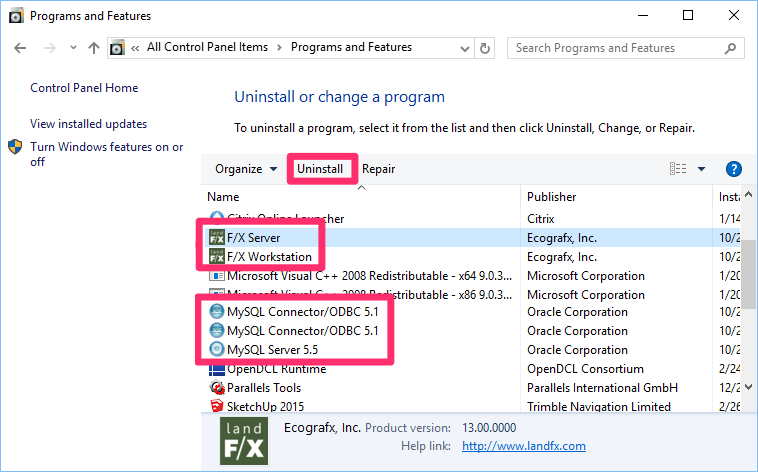
    Uninstalling the F/X Server, F/X Workstation, MySQL Server, and MySQL Connector/ODBC components in the Uninstall or change a program dialog box


    5. Rename the LandFX folder on your C: drive to LandFXold.
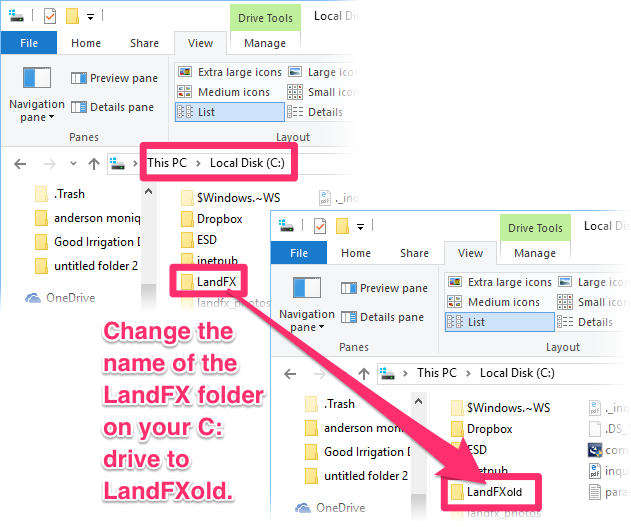
     

    Renaming the LandFX folder on the C: drive to LandFXold


    6. Open the folder C:/Program Files (x86), and delete the subfolder MySQL.

    Deleting the subfolder MySQL from the folder path C:/Program Files (x86)


    7. Follow our steps to view hidden files and folders.
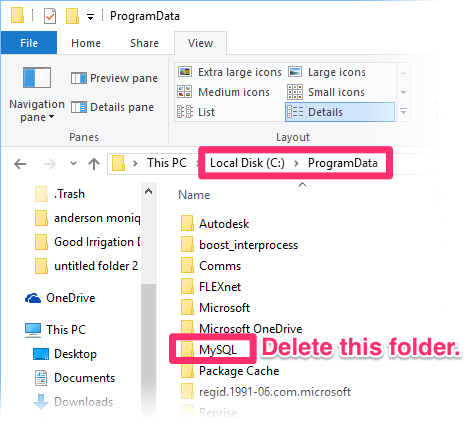


    Deleting the subfolder MySQL from the folder path C:/ProgramData

    8. Once your hidden folders are visible, open the folder C:/ProgramData, and delete the subfolder MySQL.

    You won't be able to see the ProgramData folder unless you have your hidden files and folders enabled (Step 7 above).


    9. Restart your computer. You've uninstalled Land F/X successfully.


    10. If you need to reinstall Land F/X, you can now proceed to our installation guide.

    Contact

    • Land F/X
    • PMB 351 3940 Broad St. STE 7
      San Luis Obispo, CA 93401
    • +1 805-541-1003
    Email Logo Facebook Logo Instagram Logo LinkedIn Logo
    Land F/X Logo

    Our software tailors AutoCAD®, Revit®, SketchUp®, and Rhino® to the needs of landscape architects, irrigation designers, and other professionals. We automate your most tedious tasks and ensure accuracy, giving you more time to design.

    • Portal
    • Products
    • Support
    • Videos
    • Who We Are