

Land F/X
  • Portal
  • Products
    • Detail F/X
      • Product
      • Features
      • Trial
      • Purchase
    • Planting F/X
      • Product
      • Features
      • Trial
      • Purchase
    • Irrigation F/X
      • Product
      • Features
      • Trial
      • Purchase
    • F/X CAD
    • Plugin for Revit®
    • Plugin for SketchUp®
    • Plugin for Rhino®
    • Site & Hardscape
    • Lighting
    • Manufacturer Connection
    • Academic
    • Purchase
  • Support
    • Knowledge Base
    • Documentation
    • Submit Ticket
    • Updates
    • Forum
    • Install
  • Videos
    • Power Tips
    • Webinars
    • Podcasts
  • Who We Are
    • Contact Us
    • Careers
    • Gallery
    • News
Land F/X
  • Portal
  • Products
    • Detail F/X
      • Product
      • Features
      • Trial
      • Purchase
    • Planting F/X
      • Product
      • Features
      • Trial
      • Purchase
    • Irrigation F/X
      • Product
      • Features
      • Trial
      • Purchase
    • F/X CAD
    • Plugin for Revit®
    • Plugin for SketchUp®
    • Plugin for Rhino®
    • Site & Hardscape
    • Lighting
    • Manufacturer Connection
    • Academic
    • Purchase
  • Support
    • Knowledge Base
    • Documentation
    • Submit Ticket
    • Updates
    • Forum
    • Install
  • Videos
    • Power Tips
    • Webinars
    • Podcasts
  • Who We Are
    • Contact Us
    • Careers
    • Gallery
    • News
  1. Home
  2. Knowledge Base
  3. Site & Details
  4. Blocks
  5. Land F/X Content Binder (Blocks, Graphics, Text Styles, etc.)

    Land F/X Content Binder (Blocks, Graphics, Text Styles, etc.)

    Updated on: November 17, 2025

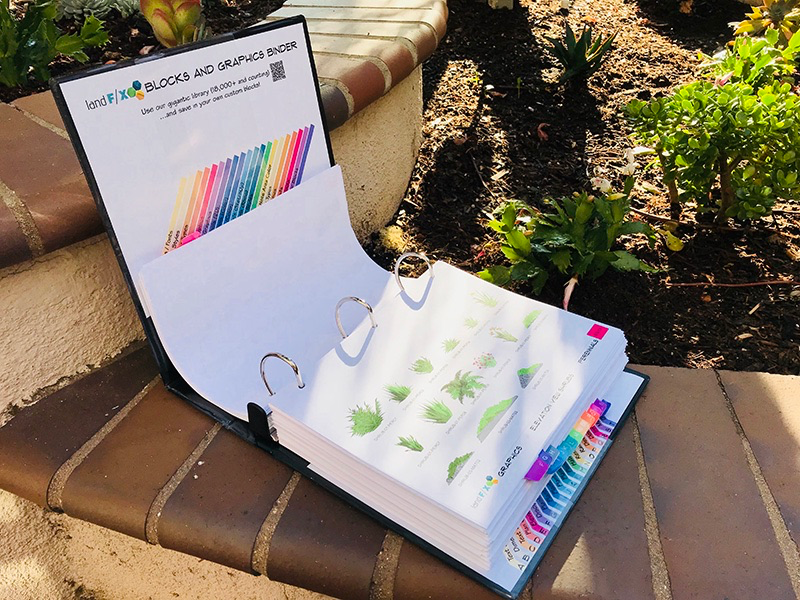
    Use this guide to print all our blocks, callouts, symbols, and details and organize them into a binder for your office to reference. You can also just download and browse the files if you're interested.


    The Land F/X Content binder can serve as a reference for determining where your office will use the default blocks that are included with our software. You might also choose to include your own content you've created and saved into your Land F/X library using our customization tools such as:
    • Save Block
    • Save Hatch
    • Save Detail
    Open Content Binder

    Our cloud-based block library includes 18,000+ blocks, with more added every week. The blocks download on demand as you use them in your drawings. We update this page quarterly, adding PDFs showing the new content we've added.


    Download links for our default content

    Block and Graphic Sections (PDFs):

    We're currently in the process of reoganizing our downloadable content to match the organizational system built into our Print Preferences tool.


    Layers

    Layers


    Default Block Layers

    Default Block Layers*

    * For your reference, we've included this list of all the layers used in the Land F/X default block libraries.
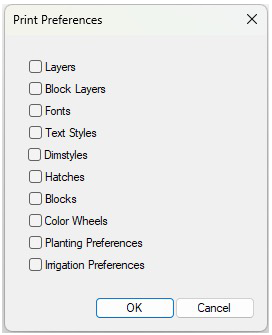
    Print Preferences dialog box


    Custom Block Layers

    Block Layers**

    ** Need to customize the layers in the Land F/X block libraries to meet your office standards? Make your changes to these layers using our Block Layers tool.


    Fonts / Text Styles

    Fonts - Text Styles.pdf

    Dimstyles

    Dimstyles.pdf

    Hatches
    • Hatches.pdf
    • Hatches - Plant Area - Color.pdf


    Blocks
    • Blocks - Detail Graphics.pdf
    • Blocks - Discipline Graphics.pdf
    • Blocks - Elevation Graphics.pdf
    • Blocks - Irrigation Blocks.pdf
    • Blocks - Plan Graphics.pdf
    • Blocks - Plant Symbols - Shrubs 2D.pdf
    • Blocks - Plant Symbols - Trees 2D.pdf
    • Blocks - Plant Symbols - Shrubs Color.pdf
    • Blocks - Plant Symbols - Trees Color.pdf
    Color Wheels

    Color Wheels.pdf

    Preferences Options
    • Planting Preferences.pdf
    • Irrigation Preferences.pdf


    Supplemental Content
    • Supplemental - Detail Callouts.pdf
    • Supplemental - Details.pdf
    • Supplemental - Linetypes.pdf
    • Supplemental - Plant Label Styles.pdf
    • Supplemental - Plant Symbols - SketchUp.pdf
    • Supplemental - Text Leader Types.pdf


    Manufacturer content

    Looking for content from our supporting manufacturers?


    How to assemble your own binder

    Looking to print out and assemble your own binder listing and displaying our default content? Here are our recommendations.


    Materials list:

    3-inch black binder with clear plastic sleeves   Example
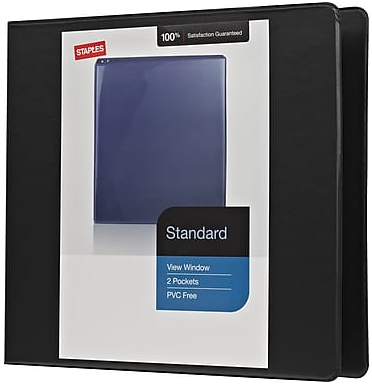
    3-inch black binder with clear plastic sleeves


    Avery Ready Index Multicolor Table of Contents Alphabetical Tab Dividers, A-Z

    Avery Ready Index Multicolor Table of Contents Alphabetical Tab Dividers, A-Z   Example


    Color Printer


    To assemble the binder:


    1. Insert the A–V tabs from the Avery Multicolor dividers into the binder rings.

    Binder assembled


    2. Use the download links above to download each section of out default content.


    Binder sections


    3. Print and three-hole-punch each section, then insert each section behind a divider in the binder, accoording to your choice of how to organize the content in your binder.


    4. Set a repeating calendar reminder to check back between six months and one year to update this binder.

    Have a suggestion for a block or manufacturer that you think should be added to the system?

    To send us a request or example of new block content, to suggest a new manufacturer, send us a technical support ticket with your message or request.

    Contact

    • Land F/X
    • PMB 351 3940 Broad St. STE 7
      San Luis Obispo, CA 93401
    • +1 805-541-1003
    Email Logo Facebook Logo Instagram Logo LinkedIn Logo
    Land F/X Logo

    Our software tailors AutoCAD®, Revit®, SketchUp®, and Rhino® to the needs of landscape architects, irrigation designers, and other professionals. We automate your most tedious tasks and ensure accuracy, giving you more time to design.

    • Portal
    • Products
    • Support
    • Videos
    • Who We Are