

Land F/X
  • Portal
  • Products
    • Detail F/X
      • Product
      • Features
      • Trial
      • Purchase
    • Planting F/X
      • Product
      • Features
      • Trial
      • Purchase
    • Irrigation F/X
      • Product
      • Features
      • Trial
      • Purchase
    • F/X CAD
    • Plugin for Revit®
    • Plugin for SketchUp®
    • Plugin for Rhino®
    • Site & Hardscape
    • Lighting
    • Manufacturer Connection
    • Academic
    • Purchase
  • Support
    • Knowledge Base
    • Documentation
    • Submit Ticket
    • Updates
    • Forum
    • Install
  • Videos
    • Power Tips
    • Webinars
    • Podcasts
  • Who We Are
    • Contact Us
    • Careers
    • Gallery
    • News
Land F/X
  • Portal
  • Products
    • Detail F/X
      • Product
      • Features
      • Trial
      • Purchase
    • Planting F/X
      • Product
      • Features
      • Trial
      • Purchase
    • Irrigation F/X
      • Product
      • Features
      • Trial
      • Purchase
    • F/X CAD
    • Plugin for Revit®
    • Plugin for SketchUp®
    • Plugin for Rhino®
    • Site & Hardscape
    • Lighting
    • Manufacturer Connection
    • Academic
    • Purchase
  • Support
    • Knowledge Base
    • Documentation
    • Submit Ticket
    • Updates
    • Forum
    • Install
  • Videos
    • Power Tips
    • Webinars
    • Podcasts
  • Who We Are
    • Contact Us
    • Careers
    • Gallery
    • News
  1. Home
  2. Knowledge Base
  3. F/X CAD & AutoCAD
  4. Errors: F/X CAD & AutoCAD
  5. Security Certificate Error (Opening AutoCAD or F/X CAD)

    []

    Catalog File 'Support\AcFields.fdc' is Not Found (Opening AutoCAD or F/X CAD)

    Updated on: April 15, 2022

    Issue

    When attempting to open F/X CAD or AutoCAD, you received an error message similar to the following:

    Catalog File 'Support\AcFields.fdc' is Not Found. (Opening AutoCAD or F/X CAD).


    CAD may start as it would normally, but you might be missing items such as ribbons or toolbars, plot style tables, and plotter configuration (PC3) files.

    Catalog File 'Support\AcFields.fdc' is Not Found


    Cause

    Your AutoCAD profile has likely become corrupt, resulting in this error message.


    Solution

    1. Close CAD.


    2. Navigate to the folder C:\Program Files\Autodesk\ AutoCAD 20xx\UserDataCache\Support (where 20xx is your year version of AutoCAD or F/X CAD).


    Copy the files AcFields.fdc and Shapes.atc from this location.


    Copy the files

    You'll need to have hidden files and folders visible to navigate to this location.

    Don't see one of these files in this location? Just copy the other one.


    3. Navigate to the folder C:\Users\username*\AppData\Roaming\Autodesk\AutoCAD 20xx**\Rxx.x***\language****\Support, and paste the copied files into this location.

    *Your computer username.

    **Your year version of AutoCAD or F/X CAD.

    ***This folder name will vary depending on your year version of CAD.

    ****Your language version of CAD (enu, or English United States, shown as an example).
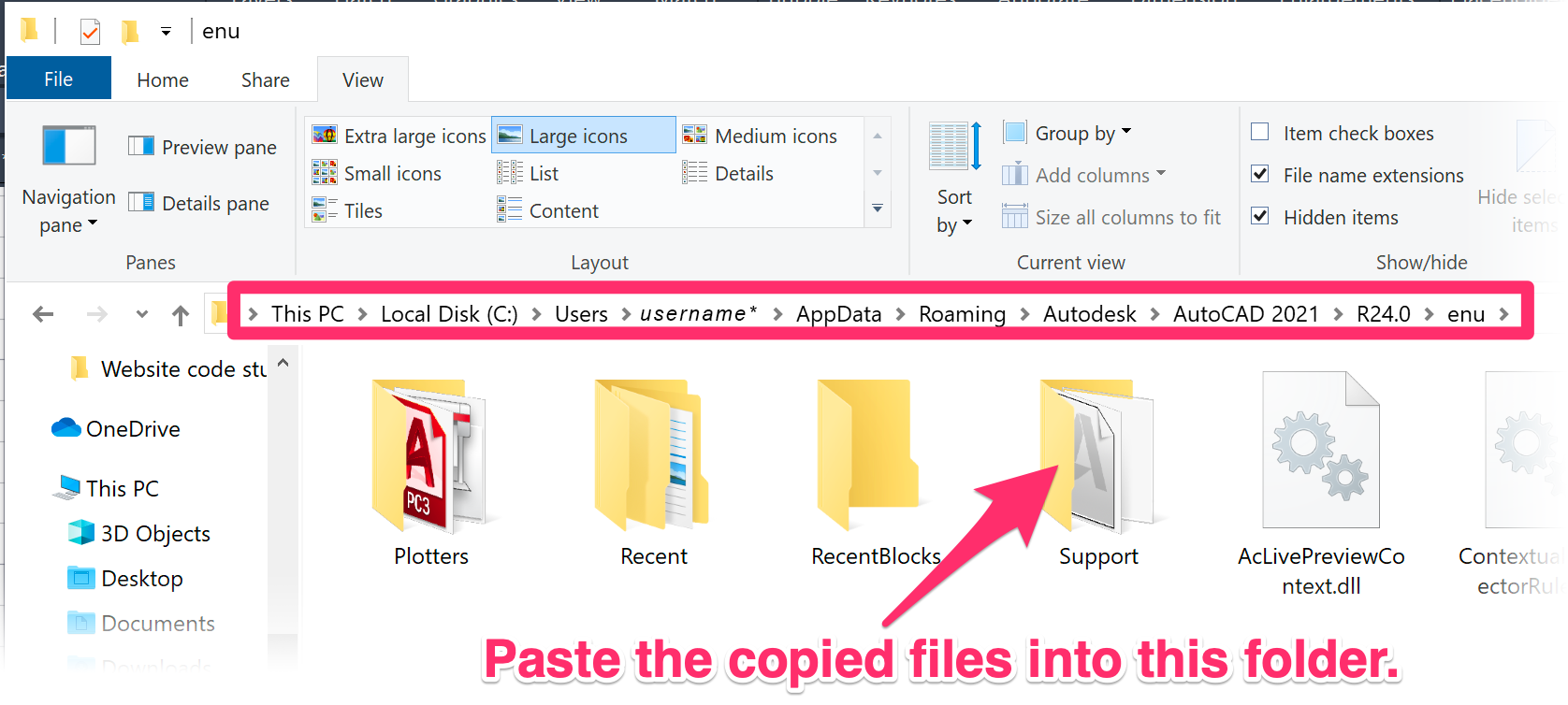
     

    paste the copied files into this location


    4. Open CAD. Still getting the error? Move on to the next step.


    5. Follow our steps to reset AutoCAD or F/X CAD to the defaults.


    Open CAD again. Still getting the error? Move on to the next step.


    6. Follow our steps to repair your CAD installation.


    You should now be able to open CAD without seeing the error.


    Still seeing the error?

    • F/X CAD users: Send us a technical support ticket detailing your issue, and letting us know you attempted these steps.
    • AutoCAD users: Contact Autodesk support.


    See the official Autodesk solution to this issue for more information.

    Contact

    • Land F/X
    • PMB 351 3940 Broad St. STE 7
      San Luis Obispo, CA 93401
    • +1 805-541-1003
    Email Logo Facebook Logo Instagram Logo LinkedIn Logo
    Land F/X Logo

    Our software tailors AutoCAD®, Revit®, SketchUp®, and Rhino® to the needs of landscape architects, irrigation designers, and other professionals. We automate your most tedious tasks and ensure accuracy, giving you more time to design.

    • Portal
    • Products
    • Support
    • Videos
    • Who We Are